Week 3 - Regex Renaissance
This week we will rediscover regular expressions a bit more in detail as we covered last year. It is neccesary so we we can make use of them later. Last time we played an interactive game regexone.com and discussed how one flavour of regex can be turned into another.
For a reminder for these see week 6 of 4060CEM.
Writing your own tools
Note
Digital forensics software such as Autopsy and FTK provide an automated solution to processing image files to identify notable data for example. However, they are general purpose software that caters for different types of investigation and therefore lack focus or timely processing of data. Being able to write programs to focus on extracting and processing data is an important skill in the digital forensics area in order to quickly triage devices or deal with new files/file formats for example.
On top of this it is highly beneficial for us to have a peak under the hood of forensic software to be able to understand the real low level happening of those complex tools.
Let's go ahead and combine wat we covered so far while we continuously hone our programming skills. Remember, you can always refer to the CUEH Python Guide if you need a reminder on what is what.
Note
The reason for this is format is twofold, 1: to have a nice searchable resource for your studies powered by some clever javascript magic. Type into the top-right searchbar: "1.21 gigawatts" and see what happens. The additional benefits of being to be able to throw in the occasional emoji is just a bonus. 🚀
Overview
The layout of this part can be broken into:
- Intro
- Metacharacters.
- Character classes.
- Repetition.
- Anchors and Boudaries
- Getting started with the pythonic way of regex
Introduction to Regular expressions
Very simplistically, Regular expressions or RegEx are just a way of syntactically tell our computers the patterns we would like to search for.
Imagine needing to find an email address in a huge text file such as this page. What would you do? You would hit search and enter the address like "john@coventry.ac.uk". Easy. The interesting bits happen if you are tasked to actually search for all of the existing email addresses. How would you approach this problem? You could brute force it? /Nope/
We would build a pattern to tell the computer what we are looking for something looking like user@domain. That however requires a couple of things from us:
- We need to realise the pattern between email addresses(usually a couple of things around an @ symbol)
- We need to write this pattern in a way that our computer can understand it, for that we need to use a language that both we and our computer understand. We use a special syntax that we need to be able to understand.
Example
Consider an email address, e.g. john.smith@gmail.com
Now think about defining an expression/ pattern to search for an email, what would that expression need to include in order to find email addresses?
Questions to ask yourself:
- What characters do email addresses have to have to be email addresses?
- What are the constraints of email addresses. For example, what characters are not allowed in email addresses?
- Are email addresses limited to upper or lower case characters?
- What other characters or characters can we expect to find in email addresses? Numbers? Symbols such as punctuation characters?
The answer and your final RegEx will depend on how precise you would like to do the matching(more on that later). If you are curious here are some valid solutions for the problem ranging from simples(producing a lot of false positives and not complete matches) to very good ones (which produce near 100% returns):
-
Contains a @ character.
@ -
Contains @ and a period somewhere after it:
@.*?\. -
Has at least one character before the @, before the period and after it:
.+@.+\..+ -
Python email regex matching everything 99%:
r"(^[a-zA-Z0-9_.+-]+@[a-zA-Z0-9-]+\.[a-zA-Z0-9-.]+$)"
Note
How the above text is easy to copy for your studies. This feature will be very useful especially with code samples later.
Just for the sake of completeness and a bit of fun, the almost never used but 100% matching RFC 822 compliant email regex:
(?:(?:\r\n)?[ \t])*(?:(?:(?:[^()<>@,;:\\".\[\] \000-\031]+(?:(?:(?:\r\n)?[ \t]
)+|\Z|(?=[\["()<>@,;:\\".\[\]]))|"(?:[^\"\r\\]|\\.|(?:(?:\r\n)?[ \t]))*"(?:(?:
\r\n)?[ \t])*)(?:\.(?:(?:\r\n)?[ \t])*(?:[^()<>@,;:\\".\[\] \000-\031]+(?:(?:(
?:\r\n)?[ \t])+|\Z|(?=[\["()<>@,;:\\".\[\]]))|"(?:[^\"\r\\]|\\.|(?:(?:\r\n)?[
\t]))*"(?:(?:\r\n)?[ \t])*))*@(?:(?:\r\n)?[ \t])*(?:[^()<>@,;:\\".\[\] \000-\0
31]+(?:(?:(?:\r\n)?[ \t])+|\Z|(?=[\["()<>@,;:\\".\[\]]))|\[([^\[\]\r\\]|\\.)*\
](?:(?:\r\n)?[ \t])*)(?:\.(?:(?:\r\n)?[ \t])*(?:[^()<>@,;:\\".\[\] \000-\031]+
(?:(?:(?:\r\n)?[ \t])+|\Z|(?=[\["()<>@,;:\\".\[\]]))|\[([^\[\]\r\\]|\\.)*\](?:
(?:\r\n)?[ \t])*))*|(?:[^()<>@,;:\\".\[\] \000-\031]+(?:(?:(?:\r\n)?[ \t])+|\Z
|(?=[\["()<>@,;:\\".\[\]]))|"(?:[^\"\r\\]|\\.|(?:(?:\r\n)?[ \t]))*"(?:(?:\r\n)
?[ \t])*)*\<(?:(?:\r\n)?[ \t])*(?:@(?:[^()<>@,;:\\".\[\] \000-\031]+(?:(?:(?:\
r\n)?[ \t])+|\Z|(?=[\["()<>@,;:\\".\[\]]))|\[([^\[\]\r\\]|\\.)*\](?:(?:\r\n)?[
 \t])*)(?:\.(?:(?:\r\n)?[ \t])*(?:[^()<>@,;:\\".\[\] \000-\031]+(?:(?:(?:\r\n)
?[ \t])+|\Z|(?=[\["()<>@,;:\\".\[\]]))|\[([^\[\]\r\\]|\\.)*\](?:(?:\r\n)?[ \t]
)*))*(?:,@(?:(?:\r\n)?[ \t])*(?:[^()<>@,;:\\".\[\] \000-\031]+(?:(?:(?:\r\n)?[
 \t])+|\Z|(?=[\["()<>@,;:\\".\[\]]))|\[([^\[\]\r\\]|\\.)*\](?:(?:\r\n)?[ \t])*
)(?:\.(?:(?:\r\n)?[ \t])*(?:[^()<>@,;:\\".\[\] \000-\031]+(?:(?:(?:\r\n)?[ \t]
)+|\Z|(?=[\["()<>@,;:\\".\[\]]))|\[([^\[\]\r\\]|\\.)*\](?:(?:\r\n)?[ \t])*))*)
*:(?:(?:\r\n)?[ \t])*)?(?:[^()<>@,;:\\".\[\] \000-\031]+(?:(?:(?:\r\n)?[ \t])+
|\Z|(?=[\["()<>@,;:\\".\[\]]))|"(?:[^\"\r\\]|\\.|(?:(?:\r\n)?[ \t]))*"(?:(?:\r
\n)?[ \t])*)(?:\.(?:(?:\r\n)?[ \t])*(?:[^()<>@,;:\\".\[\] \000-\031]+(?:(?:(?:
\r\n)?[ \t])+|\Z|(?=[\["()<>@,;:\\".\[\]]))|"(?:[^\"\r\\]|\\.|(?:(?:\r\n)?[ \t
]))*"(?:(?:\r\n)?[ \t])*))*@(?:(?:\r\n)?[ \t])*(?:[^()<>@,;:\\".\[\] \000-\031
]+(?:(?:(?:\r\n)?[ \t])+|\Z|(?=[\["()<>@,;:\\".\[\]]))|\[([^\[\]\r\\]|\\.)*\](
?:(?:\r\n)?[ \t])*)(?:\.(?:(?:\r\n)?[ \t])*(?:[^()<>@,;:\\".\[\] \000-\031]+(?
:(?:(?:\r\n)?[ \t])+|\Z|(?=[\["()<>@,;:\\".\[\]]))|\[([^\[\]\r\\]|\\.)*\](?:(?
:\r\n)?[ \t])*))*\>(?:(?:\r\n)?[ \t])*)|(?:[^()<>@,;:\\".\[\] \000-\031]+(?:(?
:(?:\r\n)?[ \t])+|\Z|(?=[\["()<>@,;:\\".\[\]]))|"(?:[^\"\r\\]|\\.|(?:(?:\r\n)?
[ \t]))*"(?:(?:\r\n)?[ \t])*)*:(?:(?:\r\n)?[ \t])*(?:(?:(?:[^()<>@,;:\\".\[\]
\000-\031]+(?:(?:(?:\r\n)?[ \t])+|\Z|(?=[\["()<>@,;:\\".\[\]]))|"(?:[^\"\r\\]|
\\.|(?:(?:\r\n)?[ \t]))*"(?:(?:\r\n)?[ \t])*)(?:\.(?:(?:\r\n)?[ \t])*(?:[^()<>
@,;:\\".\[\] \000-\031]+(?:(?:(?:\r\n)?[ \t])+|\Z|(?=[\["()<>@,;:\\".\[\]]))|"
(?:[^\"\r\\]|\\.|(?:(?:\r\n)?[ \t]))*"(?:(?:\r\n)?[ \t])*))*@(?:(?:\r\n)?[ \t]
)*(?:[^()<>@,;:\\".\[\] \000-\031]+(?:(?:(?:\r\n)?[ \t])+|\Z|(?=[\["()<>@,;:\\
".\[\]]))|\[([^\[\]\r\\]|\\.)*\](?:(?:\r\n)?[ \t])*)(?:\.(?:(?:\r\n)?[ \t])*(?
:[^()<>@,;:\\".\[\] \000-\031]+(?:(?:(?:\r\n)?[ \t])+|\Z|(?=[\["()<>@,;:\\".\[
\]]))|\[([^\[\]\r\\]|\\.)*\](?:(?:\r\n)?[ \t])*))*|(?:[^()<>@,;:\\".\[\] \000-
\031]+(?:(?:(?:\r\n)?[ \t])+|\Z|(?=[\["()<>@,;:\\".\[\]]))|"(?:[^\"\r\\]|\\.|(
?:(?:\r\n)?[ \t]))*"(?:(?:\r\n)?[ \t])*)*\<(?:(?:\r\n)?[ \t])*(?:@(?:[^()<>@,;
:\\".\[\] \000-\031]+(?:(?:(?:\r\n)?[ \t])+|\Z|(?=[\["()<>@,;:\\".\[\]]))|\[([
^\[\]\r\\]|\\.)*\](?:(?:\r\n)?[ \t])*)(?:\.(?:(?:\r\n)?[ \t])*(?:[^()<>@,;:\\"
.\[\] \000-\031]+(?:(?:(?:\r\n)?[ \t])+|\Z|(?=[\["()<>@,;:\\".\[\]]))|\[([^\[\
]\r\\]|\\.)*\](?:(?:\r\n)?[ \t])*))*(?:,@(?:(?:\r\n)?[ \t])*(?:[^()<>@,;:\\".\
[\] \000-\031]+(?:(?:(?:\r\n)?[ \t])+|\Z|(?=[\["()<>@,;:\\".\[\]]))|\[([^\[\]\
r\\]|\\.)*\](?:(?:\r\n)?[ \t])*)(?:\.(?:(?:\r\n)?[ \t])*(?:[^()<>@,;:\\".\[\]
\000-\031]+(?:(?:(?:\r\n)?[ \t])+|\Z|(?=[\["()<>@,;:\\".\[\]]))|\[([^\[\]\r\\]
|\\.)*\](?:(?:\r\n)?[ \t])*))*)*:(?:(?:\r\n)?[ \t])*)?(?:[^()<>@,;:\\".\[\] \0
00-\031]+(?:(?:(?:\r\n)?[ \t])+|\Z|(?=[\["()<>@,;:\\".\[\]]))|"(?:[^\"\r\\]|\\
.|(?:(?:\r\n)?[ \t]))*"(?:(?:\r\n)?[ \t])*)(?:\.(?:(?:\r\n)?[ \t])*(?:[^()<>@,
;:\\".\[\] \000-\031]+(?:(?:(?:\r\n)?[ \t])+|\Z|(?=[\["()<>@,;:\\".\[\]]))|"(?
:[^\"\r\\]|\\.|(?:(?:\r\n)?[ \t]))*"(?:(?:\r\n)?[ \t])*))*@(?:(?:\r\n)?[ \t])*
(?:[^()<>@,;:\\".\[\] \000-\031]+(?:(?:(?:\r\n)?[ \t])+|\Z|(?=[\["()<>@,;:\\".
\[\]]))|\[([^\[\]\r\\]|\\.)*\](?:(?:\r\n)?[ \t])*)(?:\.(?:(?:\r\n)?[ \t])*(?:[
^()<>@,;:\\".\[\] \000-\031]+(?:(?:(?:\r\n)?[ \t])+|\Z|(?=[\["()<>@,;:\\".\[\]
]))|\[([^\[\]\r\\]|\\.)*\](?:(?:\r\n)?[ \t])*))*\>(?:(?:\r\n)?[ \t])*)(?:,\s*(
?:(?:[^()<>@,;:\\".\[\] \000-\031]+(?:(?:(?:\r\n)?[ \t])+|\Z|(?=[\["()<>@,;:\\
".\[\]]))|"(?:[^\"\r\\]|\\.|(?:(?:\r\n)?[ \t]))*"(?:(?:\r\n)?[ \t])*)(?:\.(?:(
?:\r\n)?[ \t])*(?:[^()<>@,;:\\".\[\] \000-\031]+(?:(?:(?:\r\n)?[ \t])+|\Z|(?=[
\["()<>@,;:\\".\[\]]))|"(?:[^\"\r\\]|\\.|(?:(?:\r\n)?[ \t]))*"(?:(?:\r\n)?[ \t
])*))*@(?:(?:\r\n)?[ \t])*(?:[^()<>@,;:\\".\[\] \000-\031]+(?:(?:(?:\r\n)?[ \t
])+|\Z|(?=[\["()<>@,;:\\".\[\]]))|\[([^\[\]\r\\]|\\.)*\](?:(?:\r\n)?[ \t])*)(?
:\.(?:(?:\r\n)?[ \t])*(?:[^()<>@,;:\\".\[\] \000-\031]+(?:(?:(?:\r\n)?[ \t])+|
\Z|(?=[\["()<>@,;:\\".\[\]]))|\[([^\[\]\r\\]|\\.)*\](?:(?:\r\n)?[ \t])*))*|(?:
[^()<>@,;:\\".\[\] \000-\031]+(?:(?:(?:\r\n)?[ \t])+|\Z|(?=[\["()<>@,;:\\".\[\
]]))|"(?:[^\"\r\\]|\\.|(?:(?:\r\n)?[ \t]))*"(?:(?:\r\n)?[ \t])*)*\<(?:(?:\r\n)
?[ \t])*(?:@(?:[^()<>@,;:\\".\[\] \000-\031]+(?:(?:(?:\r\n)?[ \t])+|\Z|(?=[\["
()<>@,;:\\".\[\]]))|\[([^\[\]\r\\]|\\.)*\](?:(?:\r\n)?[ \t])*)(?:\.(?:(?:\r\n)
?[ \t])*(?:[^()<>@,;:\\".\[\] \000-\031]+(?:(?:(?:\r\n)?[ \t])+|\Z|(?=[\["()<>
@,;:\\".\[\]]))|\[([^\[\]\r\\]|\\.)*\](?:(?:\r\n)?[ \t])*))*(?:,@(?:(?:\r\n)?[
 \t])*(?:[^()<>@,;:\\".\[\] \000-\031]+(?:(?:(?:\r\n)?[ \t])+|\Z|(?=[\["()<>@,
;:\\".\[\]]))|\[([^\[\]\r\\]|\\.)*\](?:(?:\r\n)?[ \t])*)(?:\.(?:(?:\r\n)?[ \t]
)*(?:[^()<>@,;:\\".\[\] \000-\031]+(?:(?:(?:\r\n)?[ \t])+|\Z|(?=[\["()<>@,;:\\
".\[\]]))|\[([^\[\]\r\\]|\\.)*\](?:(?:\r\n)?[ \t])*))*)*:(?:(?:\r\n)?[ \t])*)?
(?:[^()<>@,;:\\".\[\] \000-\031]+(?:(?:(?:\r\n)?[ \t])+|\Z|(?=[\["()<>@,;:\\".
\[\]]))|"(?:[^\"\r\\]|\\.|(?:(?:\r\n)?[ \t]))*"(?:(?:\r\n)?[ \t])*)(?:\.(?:(?:
\r\n)?[ \t])*(?:[^()<>@,;:\\".\[\] \000-\031]+(?:(?:(?:\r\n)?[ \t])+|\Z|(?=[\[
"()<>@,;:\\".\[\]]))|"(?:[^\"\r\\]|\\.|(?:(?:\r\n)?[ \t]))*"(?:(?:\r\n)?[ \t])
*))*@(?:(?:\r\n)?[ \t])*(?:[^()<>@,;:\\".\[\] \000-\031]+(?:(?:(?:\r\n)?[ \t])
+|\Z|(?=[\["()<>@,;:\\".\[\]]))|\[([^\[\]\r\\]|\\.)*\](?:(?:\r\n)?[ \t])*)(?:\
.(?:(?:\r\n)?[ \t])*(?:[^()<>@,;:\\".\[\] \000-\031]+(?:(?:(?:\r\n)?[ \t])+|\Z
|(?=[\["()<>@,;:\\".\[\]]))|\[([^\[\]\r\\]|\\.)*\](?:(?:\r\n)?[ \t])*))*\>(?:(
?:\r\n)?[ \t])*))*)?;\s*)
Note
Of course chances are that you will never actually use this. Nor will you need to understand it. There are groups of very smart people who produce and validate regular expressions for nearly every occasion, so all we really need to know how to plug them into our programs.
The reason behind it being so large, is that in fact it is multiple expressions grouped together using | if you look more closely. This is called alternation and we will not cover it further here. If curius you can read about it Here
Basic principles of RegEx
Moving on with our exploration Literally 🥁
A regular expression is a character pattern describing a sequence of characters to match in text in a file or files. Simplest regular expression will define exactly a sequence of characters to match. - E.g. regular expression “21/10/2015” will only find the text 21/10/2015 so can only confirm if today’s date (as we all live in the future) is present in some digital evidence piece or not. This is referred as the Literal regex.
More complex regular expressions use special characters to define the type of character or range of characters to match rather than an exact character. For example, matching any digit 0 to 9 or define a range of characters to match, a to z. This can be cryptic at first glance given symbols such as . + * ^ affect how the regular expression
matches text and how we persieve it on sight.
Note
After you practiced a bit the cryptic nature of the special "symbols" goes away. It is very similar how your brain is hardwired to do mathematical expressions "3+5". Just by looking at it you know that the symbol "+" represents that you will do an addition there. This is a symbol what we call a metacharacter.
Metacharacters
Metacharacters are characters or character combinations that have a special meaning in
the regular expression.
Metacharacters are: . \ ^ $ | ? * + ( ) [ ] { }
Cheat Sheet:
. Match any single character except a newline
^ Match at the beginning of the line or string
$ Match at the end of the line or string
*Match zero or more of the character before the *
+ Match one or more of the character before the +
? Match zero or one of the character before the ?
| Alternation comparable to OR in Python
()Defines a group to capture
[...] Character class. Match any character in the square brackets like [A-Z] matching any characters in that range
. (Dot the metacharacter)
Simplest metacharacter is the dot character, . , in a regular expression means
match any character at that position. Allows for the expression to match variations of text rather than having to define
multiple expressions
For example, consider searching for numbers starting with 0 and containing 11 digits, in total.
- With
.we can define an expression to search for text starting with a 0 using:0..........
The above will match 01213315000 but not 01212.
However, . results in matching 0ABCDEFHIJ because . means any character. To
match numbers or specific characters need some way to limit the characters at a
position.
Note
At this time you are probably already curious to see all of this in action. Visit regex101 to have a go at testing your new RegEx Skills😎!
⚡ Let's solve a problem using .
Problem: How can we search for slight variations of the same word, for example specialized and specialised?
Look for the pattern: Effectively the same word varying by s or z, e.g. specialize vs specialise.
We could do two separate searches, one for specialise and one for specialize.
BUT If we use . to give the expression speciali.e we can match the above words but will
also match specialiie, a mis-spelling. 😑 This is what we call false positives, and most of the time we do not care to completely elimiate them. We just make a best effort.
For a better solution we need to make use something else, the []
Remember what those brackets represent? -click this-
Indeed, character classes! Well done for guessing right and/or obeying a piece of text on your screen! 🥳
Escaping Metacharacters
Matching metacharacters
It may be the case that in your regular expressions you want to match characters in text that correspond to metacharacters. What to do then ❓
Let's say you want to match the . (period) character in text rather than its
default behaviour of matching any character in text.
You might want to do this when searching for files, e.g. file.jpg, you want to match text that matches the
format for a filename including the . that separates the filename from the
extension. Something like:
[A-Za-z0-9 !#$%&’()-@^_`{}~]+\.[A-Za-z0-9 !#$%&’()-@^_`{}~]+
At this point this is foreshadowing, if it makes no sense, that is normal, it will make more sense in a couple of minutes. If you want to test it now nevertheless, potential test strings:
stuff.png
badfileName$%.&extenZ!on
iLove.b@n@n@s
When we want to match metacharacters in text we must escape 🏃♀️ them in the regular expression.
- Escaping means preceding the metacharacter with a backslash
\ \.will match now match full stops in the text.\$will match the dollar symbol in text etc
Note
You can think of escaping as a switch between the litareal meaning of the character and the regex meta meaning of it. It is a very similar concept that you are used to in programming.
[ ] Character Class
A character class defines a range of characters to match in a specific character location of a regular expression to find subtle variations in text of interest.
A character class is defined using the [ and ] characters in a regular expression.
Within the [ ] go all of the characters to match at that location in the regular
expression.
In the case of specialize and specialise the words match up to the 9th character so:
- 9th character is either a s or z.
- Character class for this would be
[sz]. - The full regular expression is then
speciali[sz]e
It is so fulfilling to solve a problem is it not? 😎
peek-a-boo
1.21 gigawatts! 1.21 gigawatts. Great Scott! ⛽🚗⚡🕖 -Found it!
Character class shorthands
In previous examples we discussed how we can use [] to build character classes. In some cases hovewer it can be quite tedious to always write out the classes for our needs, especially if our needs are used very frequently, so there exists a couple of shorthand classesses to save ourself time.
Note
Shorthand Character classes are not required, you can write RegEx without them, but they save some time. That said, they are an additional level of complexity that you need to remember, so that is the tradeoff.
The most used shorthands for our needs are the following:
\wmatches A to Z, a to z, 0 to 9 and _ . We can use this shorthand instead of[a-zA-Z0-9_]\dmatches digits 0 to 9 only. Use\dinstead of[0-9]\smatches space and tab characters.
These shorthands also have their inverse forms, meaning 'match anything apart from that shorthand'. To invert you capitalise the shorthand.
\W, \D and \S respectively.
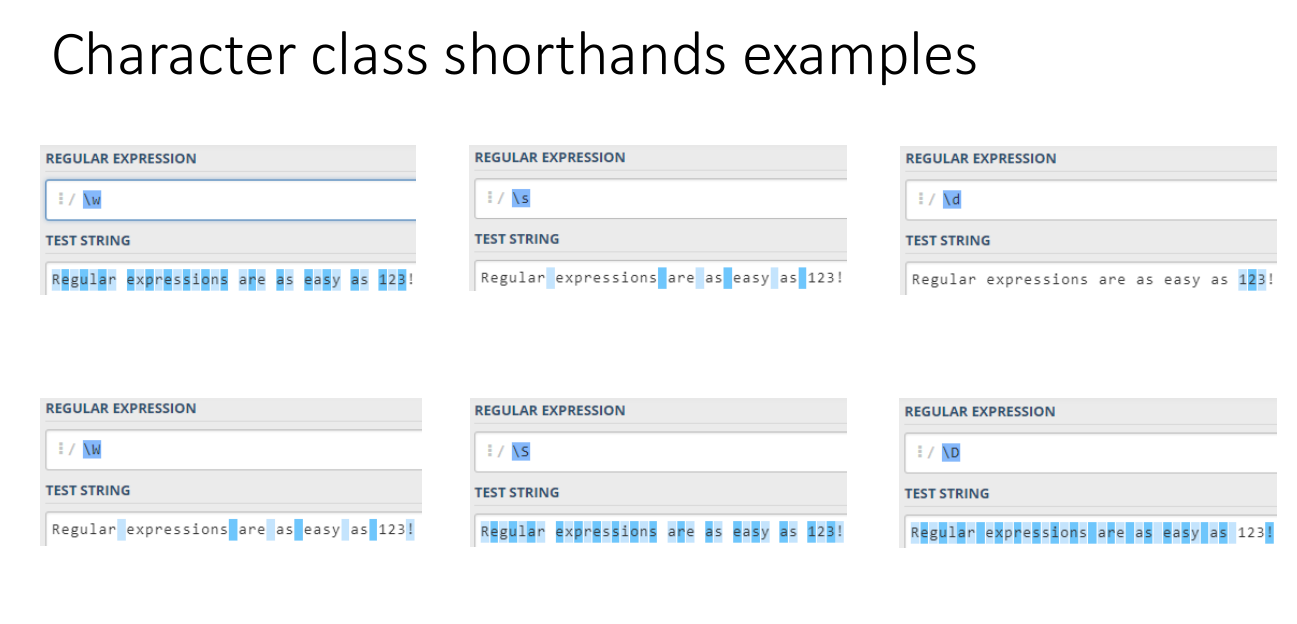
Make sure to try this feature ot on regex101 with a test string that has both characters and numbers. You can copy the one on the images:
Regular Expressions are as easy as 123!
Negated character classes
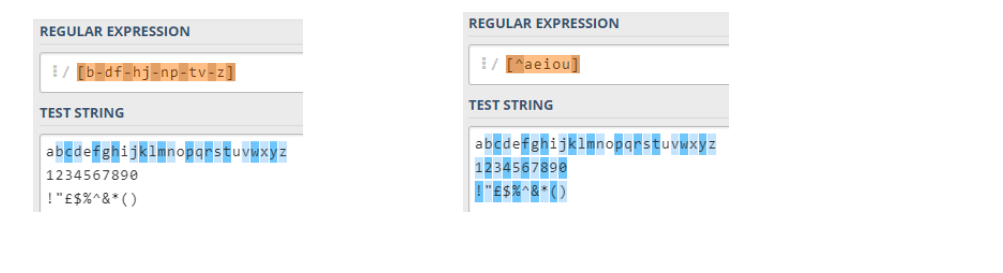
Think about the the character class [b-df-hj-np-tv-z] what does it do?
If you guess was that it matched any character as long as it wasn’t a vowel. You were correct 🐱🏍
We can achieve almost the same using the ^ in the character class.
[^aeiou] means match a character that is not a, e, i, o or u.
Try out [^b-df-hj-np-tv-z] and only vowels should be highlighted.
Almost the same…
Negating a character class is not exactly the same as a specific character class depending on requirements. For example, if you wanted to match only consonants, then [b-df-hj-np-tv-z] is the best solution because [^aeiou] will match numbers and punctuation. This may not be the match you want.
Repetition in RegEx
Let's start with an example again.
To be able to match a 4 digit number using character classes only we would
have to use the expression [0-9][0-9][0-9][0-9] and there is nothing wrong with that, but we humans love cutting corners where possible. Also imagine needing to match a number that has 1000 digits. I guess copy/paste would help, but you get the idea.
Instead of doing so we can represent such repetition using quantifier metacharacters * and +
*means match the previous character 0, 1 or more times.+means match the previous character 1 or more times.?means match the previus character 0 or 1 times.
Examples: If you want, try them out in regex101 with appropriate test strings that come to your mind. Make sure you have "python" selected as the flavour.
a+means match at least one aa*means match zero, one or more a’.a+bmeans match one or more a’s followed by a ba*bmeans match any number of a’s followed by a b.[0-9]+means match one or more of the digits 0 to 9[a-zA-z][a-zA-z][0-9][0-9]?means we could match 2 letteres and a digit, followed by a potential digit. CV2 or CV23
What do you think the regular expression .* will do?
Think about it and test it in regex101.
Repetition, there is more to the story
The above are only part of the story, we also can match a regular expression exactly n times or match between n, m times. This and greedyness are not part of this session, but if you are interested these are a couple of good places to read:
Metacharacters inside Character classes
The metacharacters shown previously allow us to define a pattern or affect the
regular expression is someway, e.g. . matches any character. When we use metacharacters in a character class, [ ] , the metacharacter
becomes a literal character to match. for example:
- A
$in a character class becomes a $ the dollar sign itself. We may be looking for amounts of money in dollars or pounds.[$£][0-9][.0-9][.0-9][.0-9][.0-9]would match $10.00 or £10.00. Stop for a moment and think this one through again.
Whereas $ outside of [ ] means it defines what characters to match at the end of
a line. Will look at $ and ^ in detail next time.
Challange to test your understanding so far:
Formulate a regular expression on regex101 using quantifiers to match only:
abcda
abbcdda
aabccda
acda
But not the string
aca
Hint: think about the characters strings have in common and what they don’t have in common with last string
This is a solution
r"a+[bc]+d+a" but im sure it can be done in different ways. Try to unpack what is going on there.
Anchors and boundaries
AKA Matching text at the beginning or end of a line, or both
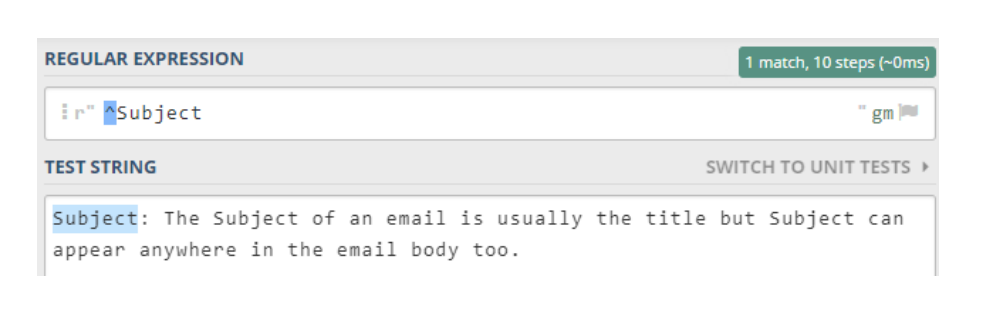
The regular expression developed so far match text anywhere in a line of text or block of text, depending on the flags1 setting. It may be the case we want to match text that occurs at the start or end of a line. For example, we may have a text file that contain emails and want to find the lines starting with the text “Subject” as “Subject” defines the main title of the email. If we use the regular expression, “Subject”, then all email titles should be found but also all instances of the word “Subject” in the email text.
What we need to do is indicate we only want lines that start with “Subject”.
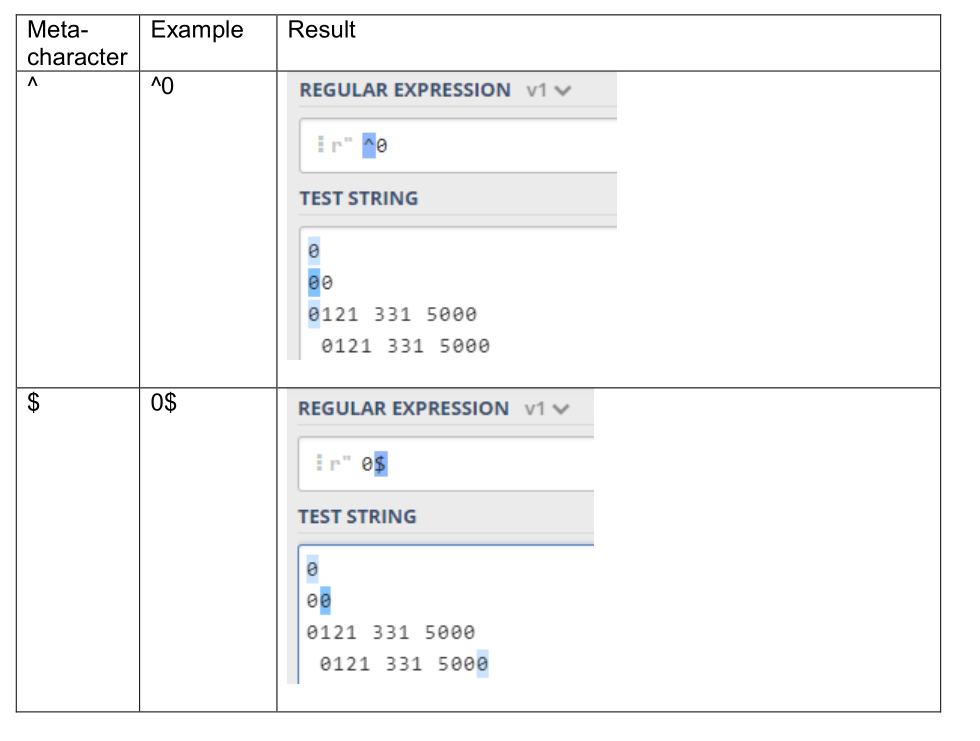
We could do this using the anchor metacharacters, ^ and $, where ^ means the start of
the line and $ means the end of the line. With ^, all of the characters after ^ must be
at the start of the line for the regular expression to match them.
With $, all of the characters before the $ must be at the end of the line for the regular expression to
match. We can have a regular expression that has ^ and $ which defines what characters must be at the beginning and end of the line.
Below are some examples of using the anchor metacharacters and the result (Replicate these yourself).
So to find all lines starting with Subject we use the regular expression ^Subject as
shown below:
Pythonic way of doing regex
So far covered a number of features of regular expressions such as quantifiers, groups, anchors, boundaries, dot, alternation etc. using regex101.com to test expressions.
Using regex101.com however has its limitations. It’s okay for checking expressions with small amounts of text but cannot search a file or files in a file system. Also, it cannot handle binary data.
The solution is to use regular expression in software with a tool like grep or play with a programming language’s regular expression engine.
Implementing regex in our source code can be done with the built in re module in python.
In a nutshell for now, let's use the interpreter to actually replace regex101 functionality, just in case there is a zombie apocalipse and there is no more internet.
>>> import re
>>> re.findall('stuff',"This is a sentence with some stuff init")
This should return stuff! That is great as everyone loves stuff😀. Let's try it with a non literal pattern, like the previous example:
import re

regex = r"a+[bc]+d+a"

test_str = "abcda abbcdda aabccda acda ada aca"

re.findall(regex, test_str)
This should return:
['abcda', 'abbcdda', 'aabccda', 'acda']
🤔🤔 I am wondering what the 'r' at the start of the pattern string designates... Can you figure it out with the help of your big brother?
🏡TASK:
Your homework exercise is to out all the examples we did on regex101 in this document but now using python.
🧪LabTask
The lab for this week is a brief intro to python re.
A quick practical on re.
These exercises comprise of practice exercises to help you practice regex in python. It is recommended that you should keep a record of your attempts in your selected form od documentation.
You can simply use IDLE on your computer to work through this, but if you have an editor/IDE preference feel free to use that.
Source code is deliberately on a screenshot, just so you type a bit. If you think this lab is way under your level of coding, feel free to skip it. No need to type in the comments, unless you want to.
I am not fully cruel though, here is the test string:
text = ("Silence, Earthling! My Name Is Darth Vader. I Am An Extraterrestrial From The Planet Vulcan. 12/11/1985 ")
The below program claims it is obvious. But is it really? Lets find out!
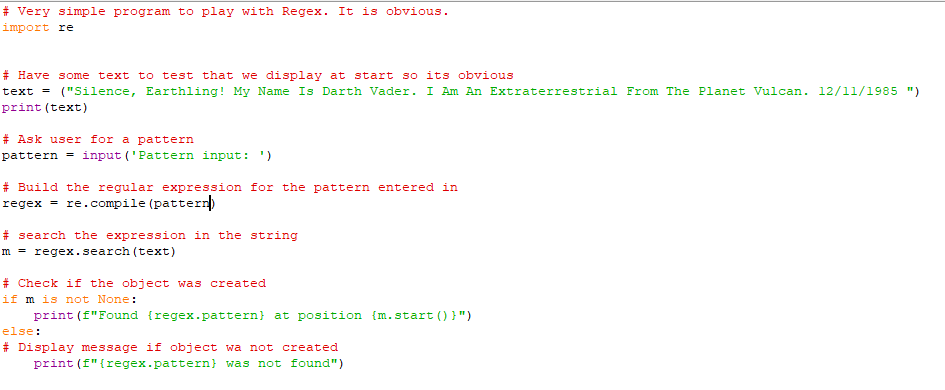
Task 1
Give it a go. Type in something literal and see what happens:

As you can see above, currently we do not ignore the case. That is a relatively easy fix just change the line to look like this:
regex = re.compile(pattern, re.IGNORECASE)
🧭 Btw, what does the position displayed mean? The answer can be found somewhere here: DOCS
Task 2
- Run the program with the input of
anand record the position. Note at this moment that there is more than oneanin the string, and you are matching the first one. - Modify the program to find the next occurrence of
anin the string. To do this you can make use of theposparameter and set it to the value you wrote down previously.
What do you mean pos parameter author?
Well. Search is an object method of regex in the re module. In the docs it is referred as search(string[, pos[, endpos]])
in this program it searches string for the pattern compiled in the regular expression object returning a match object if found or None if not.
There are two optional parameters pos and endpos. The [] means optional, you do not include [] in your Python programs.
So then, can you figure out what to change? If not click to reveal the answer
.
.
# search the expression in the string
#m = regex.search(text, 50)
m = regex.search(text, pos=50)

# wont work:
#m = regex.search(text, stuff=50)
.
.
.
The first two are valid, but the secnod option is preferred for more clear code.
Task 3
Let's type in a new pattern to get the date from the string. \d\d.\d\d.\d\d\d\d
It hovewer it only still returns the position so we need to tweak or program a little bit at our f string:
# Check if the object was created
if m is not None:
    print(f"Found {regex.pattern} at position {m.start()} with text {text[m.start():m.end()]}")
But what did we do here? I hear you asking. Let's explore the match object.
It is based on the Based on the Python class re.MatchObject and is returned by regular expression functions. It stores the start and end positions of where the pattern was matched and groups that were matched if the pattern contained groups, ().
MatchObject methods:
It has the following methods:
- start()
- end()
- span()
- and more in docs if you are curious
start() and end() return the positions, respectively, where the pattern
starts and ends. span() returns these two numbers in a tuple.
Using the MatchObject start() and end() methods we can find what was matched. Useful when the regular expression uses metacharacters such as . , \w, \d, etc. and the quantifiers. As we kindof would want to know what was matched for the pattern.
So for the above example, consider the basic date matcher expression \d\d.\d\d.\d\d\d\d
If matched then know there’s a date in the search text, but what was the date? We can use start() and end() to define a slice to obtain the matched characters.
Hence the {text[m.start():m.end()]}
In case you don't remember from last year about :
The : is the Python slice operator and allows us to specify the starting point, ending point or both, in characters (in this case) to extract from a string. For example, text[0:4] would slice characters from position 0 to position 4 but not including the character at position 4. It would result in the characters Sile from the string used in this program.
findall( )
Change your code with the following:
.
.
.
# m = regex.seach(text)
m = regex.findall(text)
.
.
.
#   print(f"Found {regex.pattern} at position {m.start()} with text {text[m.start():m.end()]}")
    print(f"Found {m}")
What is now the result if you are looking for the pattern an again?
should look like this Found ['an', 'an']
Can you modify the above so it shows the postions as well?
finditer( )
This is the easy way of doing the previous requirement. Displaying the pattern and the position the same time.
# Still a very simple prgram to carry on demonstrating
import re

# Have some text to test that we display at start so its obvious
text = ("Silence, Earthling! My Name Is Darth Vader. I Am An Extraterrestrial From The Planet Vulcan. 12/11/1985 ")
print(text)

# Ask user for a pattern
pattern = (input('Pattern input: '))

# Build the regular expression for the pattern entered in
regex = re.compile(pattern)

# Search for  expression in the string
matches = regex.finditer(text)

if matches is not None:
    for match in matches:
        print(f"found {regex.pattern} at position {match.start()}")
else:
    # display a message if regex was not found as macth object has been created.
    print(f"{regex.pattern} was not found")
Silence, Earthling! My Name Is Darth Vader. I Am An Extraterrestrial From The Planet Vulcan. 12/11/1985
Pattern input: an
found an at position 80
found an at position 89
All your passwords belong to me
Let's load a dataset from a file. This is something you guys should already know how to do, loading a file and iterating through it in search of patterns in a list. Just in case you forgot it:
import re
f =open('data.txt', 'rt')
lines = f.readlines()
f.close()
regex = re.compile('delorean')
linecount = 0
for line in lines:
    m = regex.search(line)
    if m is not None:
        print(f"Found {regex.pattern} on line {linecount} at position {m.start()}")
    linecount = linecount + 1
The above program is now without comments as you understand its workings fully at this point.
Your task is to make sure that it finds every iteration of the word deloran that could be someones password. It could be spelled alternately with caps, or leet. Perhaps it is mispelled. Make sure you find them all from the dataset data.txt available from here.
You should also modify the program so that instead of having to modify the regular expression in the source code, the regular expression is stored in a file, for example regex.txt, and the program reads the regular expression from the file.
Summary
- Regular expressions are a powerful way of searching text(and other things).
- Regular expressions can be literal or define a pattern to match with.
- Patterns are defined using metacharacters such as dot,
. ? $etc. Essentially creating their own syntax. -
Can be cryptic, but lucky for us a lot of research went into the field already, so ready made examples and "cookbooks" readily available.
-
Character class shorthands
\d,\wand\srepresent digits, word characters and whitespace. - Their negated forms
\D,\Wand\Sto mean not digits, not word characters and not whitespace. - Negate a character class by using a
^after the [. Means don’t match the characters after the^. - Searching for characters which are metacharacters in regular expressions
requires escaping them by putting a
\before the character. For example, to search for a + character in text need to use\+. - Exception is in character classes were metacharacters become literal
characters.
[+-*]means match the character+,-or*in text.
Sources and references
https://docs.python.org/3/library/re.html
https://docs.microsoft.com/en-us/dotnet/standard/base-types/quantifiers-in-regular-expressions
Wrap up
I hope you had a bit of fun playing with python and regex. See you guys next week.
-
The regex flags or regex options are the way to influence the way the internal engine should match patters. In regex101 you can check them out by clicking on the "gm aftre your regex. ↩