Week 2, Storage Forensics 1
Session Recording Should appear on AULA for the online Students
Slides
There are accompanying slides for this Material. Grab them HERE
Info
The lab task is at the end of this document, click on the TOC on the right to access it faster. ➡️🧨🎉
Welcome
Welcome to today's session, this is part one of the next three weeks where we are going to cover storage forensics. After completing this week you should be:
- Understand the differences between Magnetic and Solid State data storage
- Understand operation of most common HDD and SDD
- Draw conclusion on how storage media influences the Forensics processes
- Do your own further guided reading on the topic
◀◀ Relevant Recap from last year:
- The potential sources for our Digital Forensics data is practically limitless
- We use Forensic images in Forensics
- Those are not pixel data picture, rather “snapshots” of data on a machine
- Bitstream VS Backup
- We distinguish between Live and Static Acquisition
- Data can come from outside of the “computer”
- We make 2 copies and validate our results on Static acquisition
Info
📝If the above jiggled your memory and made sense to you, then great! if not, I suggest checking out 4060 Week 4
🤿Let's get started with a TL;DR1
Are HDDs the past and SSDs the new future of data storage?
In some respects yes, BUT Magnetic HDDs as a technology is far from dead and is not being replaced by SSDs any time soon. The amount of research and development going into HDDs is staggering, and manufacturers always come up with awesome new ideas on how to cram more data into a given size of platter all the time. One of them being HAMR2 which coincidentally gave the title for this week.
- Solid-state drives (SSD) are predominantly being used as The storage medium in consumer devices these days.
- Most of your digital devices like desktop computers, laptops, tablets, smart watches and smart phones use SSDs.
- SSD uses flash memory to store data.
- Unlike “traditional” hard drives, it is comparably harder to recover deleted data from SSDs, more care has to be taken
- The above also means it consequently can impact digital investigations detrimentally.
- Traditional HDDs are not a dead technology
- Flash memory is not something shiny and new
Never trust the text you are reading, just take a look around you and check all the devices using SSds.3 SSDs are now the most common storage devices these days in the personal computing space. Just think about your desktops, tablets smartphones etc. They are using SSDs internally, some of them even have them soldered directly to the main circuit board of the system. We are not far away from SOC integrated SSDs
Note
SSD uses something called FLASH memory as data storage (more on that later) Important to note that Flash is not a new technology, it is a electronic non-volatile computer memory based storage medium and dates back to 1987 where it was first introduced commercially by Toshiba.
Unlike previous forms of data storage, flash memory is an EEPROM form of computer memory and thus does not require a power source to retain the data.
The name flash is sad to has its origins in the process of the memory erasure, which could erase all the data on the entire chip at one time, just like a camera’s flash. Of course flash since evolved greatly in technology form the original implementation.
Important to note
Unlike the traditional HDD it SSDs have some key differences that makes forensic data recovery different
Difference between forensics on a magnetic hard disk vs an SSD
In a Nutshell... 🥜
Lets start with looking the key technical differences between Forensics on a magnetic hard disk VS an SSD. This document should give you that overview in about 20 minutes.
What should we think about?
- Relevant Forensics concepts
- Basic operation of most common HDD and SDD, as we need to understand them, to be able to work with them.
- What do these differences in operation translate to data recovery and forensics in general? (At an abstract level)
- What is out there in terms of technology.
- Our options for engaging with the drives.
Next we will look at the basic operation of a HDD and then we explore an SDD to a degree that aids our understanding to highlight the different approaches we must take when performing forensics on any of these.
Info
This is a bit of hardware engineering that I feel we should explore. Both of these technologies are fascinating, but I am not a HW engineer, for a more complete picture on how things work, just perform a keyword search online.
📀 Disk technology - Magnetic
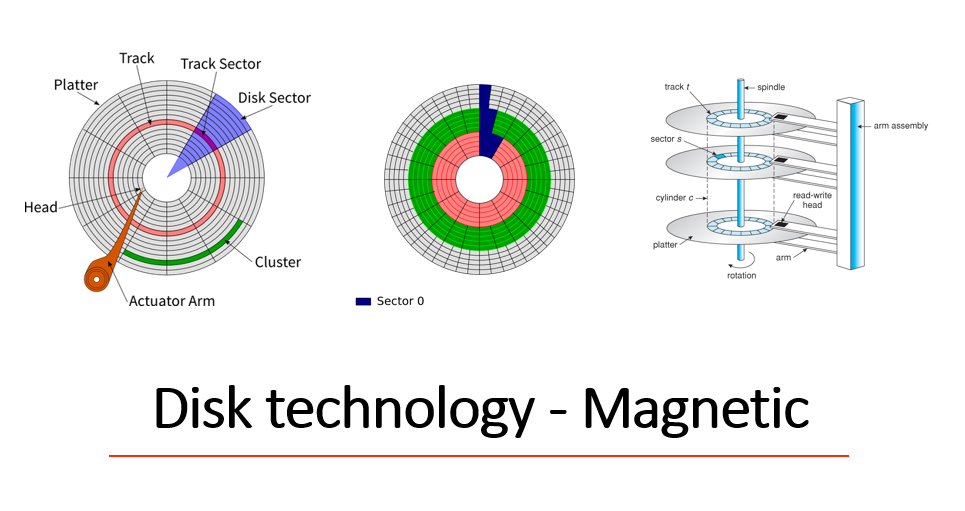
Here is the quick summary:
A hard drive stores data on a series of spinning magnetic disks called platters. There’s an actuator arm with read/write heads attached to it. This arm positions the read-write heads over the correct area of the drive to read or write information.
Because the drive heads must align over an area of the disk in order to read or write data, and the disk is constantly spinning, there’s a delay before data can be accessed. The drive may need to read from multiple locations in order to launch a program or load a file, which means it may have to wait for the platters to spin into the proper position multiple times before it can complete the command. If a drive is asleep or in a low-power state, it can take several seconds more for the disk to spin up to full power and begin operating.
Data is organised by sectors of 512bytes and is used to be the legacy. Advanced format drives use 4K Sectors. So they solves the sectoring problem, as files are huge. OS software on the other hand lagged behind when adopting this, and such there is an arbitrarily divide of data into 512bytes of data/ sector on an OS level usually depending on OS version.
💿Platters
This is the process the in which our storage medium is created:
Platters are typically made using an aluminium or glass and ceramic substrate. In disk manufacturing, a thin coating is deposited on both sides of the substrate, mostly by a vacuum deposition process called magnetron sputtering. The coating has a complex layered structure consisting of various metallic (mostly non-magnetic) alloys as underlayers, optimized for the control of the crystallographic orientation and the grain size of the actual magnetic media layer on top of them, i.e. the film storing the bits of information.
On top of it a protective carbon-based overcoat is deposited in the same sputtering process. In post-processing a nanometre thin polymeric lubricant layer gets deposited on top of the sputtered structure by dipping the disk into a solvent solution, after which the disk is buffed by various processes to eliminate small defects and verified by a special sensor on a flying head for absence of any remaining impurities or other defects (where the size of the bit given above roughly sets the scale for what constitutes a significant defect size)
Info
Most of the above is sourced from the relevant Wikipedia article, if you would like to ponder down platter alley.
Great, now we know what the data is stored on, the only question left is actually the how? As it turns out, there are a lot of different ways to achieve that, here is a couple most used.
LMR PMR GMR
Important to note
On a platter the data is actually stored as magnetic flux reversals instead of 1s and 0s as many think. But in fact we never store ones and zeros we just store things that can be represented as such if needed.
Everything is pretty much based on yet another effect of electromagnetism that was discovered by Michael Faraday in 1831. He found that if a conductor is passed through a moving magnetic field, an electrical current is generated. As the polarity of the magnetic field changes, so does the direction of the electric current’s flow.
The concepts did not change really since the early models oh hard drives, modern magnetic recording happens by magnetizing sections of the Recording medium(Platter) but there are a lot of engineering trickery employed to increase to an ever higher data density like: perpendicular recording, multi-layer recording and even using Lasers! This process is going on parallel to also trying to speed up of the disc use clever algorithms for storing the same info across multiple platters/sides which are at the exact position a given time the heads are each rotation, as an example.
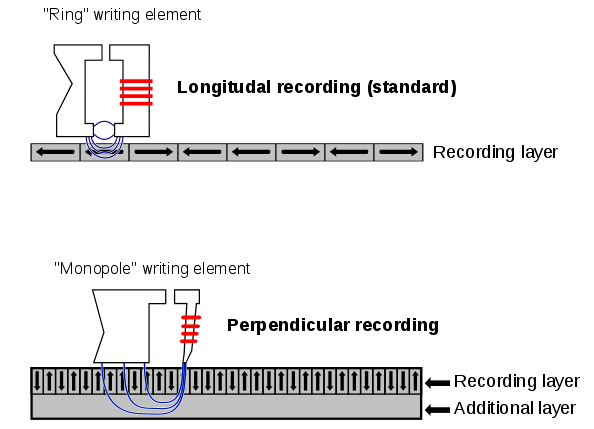
PMR
It has generally the density of LMR by about 3X. The following image makes it a bit more clear on what is going on: (Thanks Wikipedia):
Things to take away from HDDs
- Data stored in sectors of size 4KiB (512bytes on old (<2010) disks)
- The term block is also sometimes used, but block is an OS specific term in this context (normally 4KiB though)
- Data is addressed at sector level and stored in sector sized chunks
- Data is addressed using LBA at the OS/driver level and converted to something else like (Cylinder-head-sector (CHS)) by the disk firmware, but that depends by the manufacturer
How SSD-s Are different
Nand Flash Arrays
Note
“If I had asked people what they wanted, they would have said faster horses.” - Probably Henry Ford when asked about his opinion of the NAND Flash arrays
Solid-state drives are called that specifically because they don’t rely on moving parts or spinning disks. Instead, data is saved to a pool of NAND flash. NAND itself is made up of what are called floating gate transistors. Unlike the transistor designs used in DRAM, which must be refreshed multiple times per second, NAND flash is designed to retain its charge state even when not powered up. This makes NAND a type of non-volatile memory.
SSD in Detail:
As with the spinny magnetized disks, before we can understand forensics, we need to understand the inner workings for some detail. We should be in particular interested by what and how our data is stored on and SSD. Let's have a look at a real world example.
Note
The following image is CRUCIAL for understanding (I am not sorry)
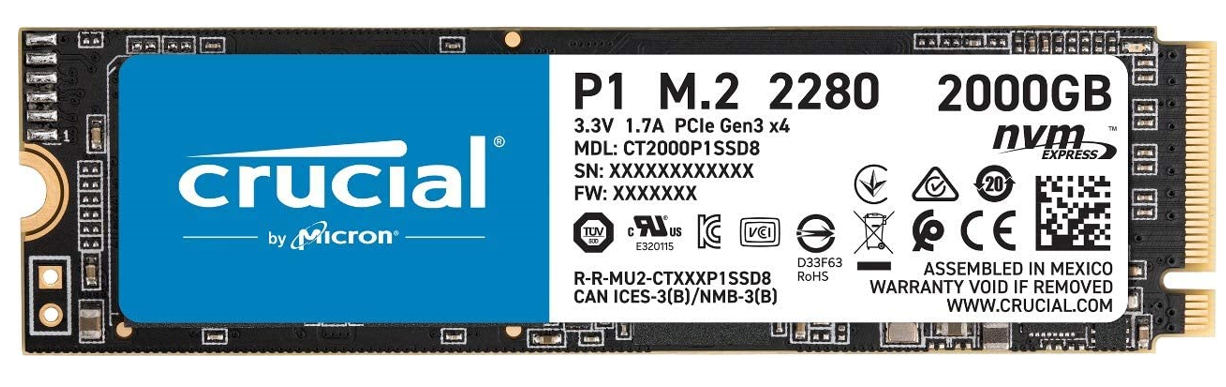
So, we have this device, these are some technical features listed. What do they mean? If you purchased an SSD lately you might have come across these, but very few of us actually dig deeper. Let's have a look at what we can see. It has acronyms like these listed on the label:
- P1
- M.2
- 2280
- 2000GB
- NVMExpress
All of them interesting and useful if we make a purchasing decision, but non of them are hinting at how exactly the data is stored on this particular device(Hence if you do not mean what those are I leave it to you to research them). After digging a bit deeper based on the model number, we can find out that the actual memory used on this drive is manufactured by Micron and apparently it is QLC type.
Working our way back from that info, QLC appears to be a type of NAND Structure, and that is where our data is apparently being stored. But what is a NAND structure?
3D Charge Trap NAND Flash Memories
Turns out it is a way for us to be trapping electrons (And keeping them in place for 10 years) Using not much more but the power of Quantum Physics!
Below you can see a very simplistic view of a single memory cell. We are trapping charge(electron) in a specific layer designed to capture it. That on its own would not be of much use if we could not actually be able to read the voltage present in the trap. Finally we have something that we can assign our data bits to! 1 for no charge, 0 for charge!
Note
Mapping 1 for no charge and 0 for charge sounds a bit counter intuitive, but from the internal workings of the SSD this, arrangement actually makes better sense.
This is what we refer to as SLC NAND, the controller only needs to know if the bit is a 0 or a 1. That however does not really satisfy our needs of perpetually more data density, so the SSD engineers are woking hard to come up with more (data) dense solutions all the time, just like with the HDDs. The next iteration was named MLC NAND, where the single cell may have four values — 00, 01, 10, or 11, using a pair of voltage states, based on the precision of voltage differences we can read out of it. This process of density is currently ongoing with TLC NAND the cell can have eight values with three states, and QLC that has 16 values with 4 states.
Reading the proper value out of the cell requires the memory controller to use an extremely precise voltage to ascertain how any particular cell is charged. Remember, that is a single memory cell we are talking about, being able to store four bits of data using the 16 states of voltages.
RECAP
Magnetic HDDs store our data on multiple fast spinning disks writing and reading magnetic flux changes sometimes with the help of lasers, while SSDs store our data in tiny cells designed to trap electrons for 10+ years with quantum physics, which of many are squeezed together into a grid and these grids are then sandwitched on top of each other. Great!
This is Charge trap memory cell 3D NAND for you. This particular example of QLC 64 Layers(grids of cells) stacked on top of each other, It is important to note however, that there is also a competing technology called floating-gate memory cell which achieves the same essentially but with different methods on the cell level. Again, its something for you to investigate if you are curious.
So, back to our QLC NAND based SSD.
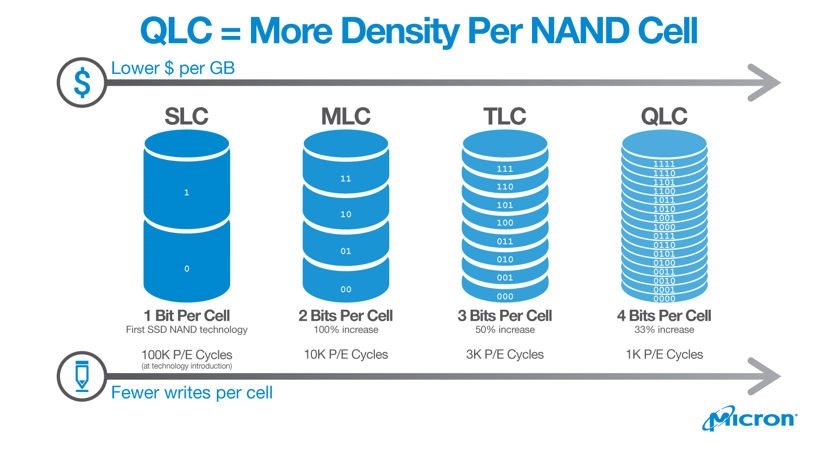
The key differences is Density
There are two things to notice in the above chart. First, note how adding more bits per cell of NAND has a significant impact on the memory’s performance. It’s worse for writes as opposed to reads — typical triple-level-cell (TLC) latency is 4x worse compared with single-level cell (SLC) NAND for reads, but 6x worse for writes. Erase latencies are also significantly impacted. The impact isn’t proportional either — TLC NAND is nearly twice as slow as MLC NAND, despite holding just 50% more data (three bits per cell, instead of two). This is also true for QLC drives which store even more bits at varying voltage levels within the same cell.
Reads Writes and Erasure
All that we need to remember for the next
The smallest unit of an SSD is a page, which is composed of several memory cells, and is usually 4 KB in size. Several pages on the SSD are summarized to a block. A block is the smallest unit of access on a SSD. Currently, 128 pages are mostly combined into one block; therefore, a block contains 512 KB -Is this number a coincidence?
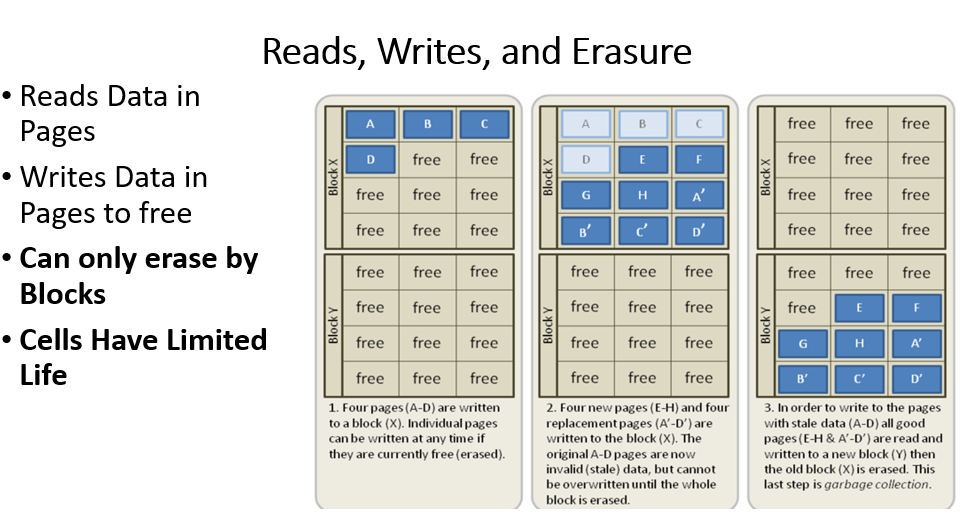
One of the functional limitations of SSDs is while they can read and write data very quickly to an empty drive, overwriting data is much slower. This is because while SSDs read data at the page level (meaning from individual rows within the NAND memory grid) and can write at the page level, assuming surrounding cells are empty, they can only erase data at the block level.
This is because the act of erasing NAND flash requires a very high amount of voltage comparatively. While you can theoretically erase NAND at the page level, the amount of voltage required stresses the individual cells around the cells that are being re-written. Erasing data at the block level helps mitigate this problem.
The only way for an SSD to update an existing page is to copy the contents of the entire block into memory, erase the block, and then write the contents of the old block + the updated page. If the drive is full and there are no empty pages available, the SSD must first scan for blocks that are marked for deletion but that haven’t been deleted yet, erase them, and then write the data to the now-erased page. This is why SSDs can become slower as they age and fill up — a mostly-empty drive is full of blocks that can be written immediately, a mostly-full drive is more likely to be forced through the entire program/erase sequence.
SSDs write at the page level (4KiB), however, SSDs do not overwrite data.
When an SSD needs to overwrite, a block of pages (normally 128 4KiB pages) is altered as follows:
- Read the block into memory
- Modify the block in memory
- Erase that block on the SSD
- Write the data back to another block on the SSD
- Old data is preserved the same as it is for a conventional HDD
SSDs run this garbage collection process constantly in the background
This leads to some interesting properties:
All of which impact the data recovery from these drives. Control and the controller firmware of SSDs is very complex compared to HDDs, SSDs will need to employ tricks like :
- Wear Levelling
- Garbage Collection
- Over Provisioning
- TRIM
SSD Wear levelling details
Every time you use a part of an SSD, it degrades. Use it too much and it stops working If left unchecked, this could lead to Data corruption The firmware controller of an SSD implements wear levelling to prevent this. At quiet moments(little load on the drive), frequently used data is moved to less worn parts of the SSD automagically. Care is taken to make sure that data isn’t moved unnecessarily, but wear levelling is still a constant process. This can mean that there are multiple copies of the data on the SSD, but only one that the OS knows about as the entire process is abstracted away, and generally your system has no means of accessing this information or change this behaviour.
SSD Corrosion
Modern SSDs in modern OSes can suffer from forensic data corrosion through use of the TRIM command for SSDs If we are continually making copies of everything, every time we need to rewrite then that could leave lots of dirty pages around (esp as erasing takes time) We are probably copying data that isn’t valid any more as all pages are copied TRIM allows the OS to mark a page as “no longer needed” and TRIM-med pages will not be copied during an overwrite process. Because the garbage collection is running constantly, as is wear levelling, this means that deleted data will get physically removed from the SSD in a relatively short period of time! Fortunately(??) not all consumer drives implement TRIM properly but this is something you can not count on.
SSds are potentially destroying/altering data/ evidence because:
Flash Translation Layer (Another built in Abstract to LBA(Logical Block Addressing)) Constant Wear Levelling running Constant Automatic Garbage Collection Self corrosion(The process of destroying evidence because of the above) Encryption in Hardware!
We just did an image of a new drive, Questions We need to ask then?
Admissible? Trustable? What Are the processes to recover? Will it change at a later stage? Remember the taking 2 copies and storing the source ssd in a safe location? What happens when we take it out and plug it in?
What are our options as Forensic Scientist in 2021?
The good: Imaging Devices are catching up Processes are catching up Needs more care in the process, and people are working on solutions continuously The “Keep in mind” Should be considered as a grey area as far of forensic recovery and legal validation are concerned Past data and data blocks can be deleted without any warning
Things to explore further:
- NVME – The connection standard and how it makes forensic recovery different
- Optane- What is it? How does it operate?
- Issues Soldered on formats of SSDs that come with modern laptops
- What about devices like Phones?
Additional Reading/ References:
Inside Solid State Drives (SSDs) Second Edition /Springer/
Solid State Drives: The Beginning of the End for Current Practice in Digital Forensic Recovery? DOI: 10.15394/jdfsl.2010.1078
All mighty Wikipedia.
🃏 Week2 Lab Work
We will start off very easy here, is the task:
It is crucial for you to start documenting your investigation in some way. Forensic note taking is not only key for your career, it is also important for succeeding for this module.
Why not try to use MKDocs with the material theme( all running in Python) with proper version control(git) to achieve this? You are already an expert in these from last year, and you will have an entire semester of material in the programming module ahead of you to play with those things.
You also seen in the past that this toolchain is pretty powerful to keep records in plain text with proper version control, while giving you the option to disseminate information easyly if needed. So that said make sure to create a repo called 5065CEM_Notes in GitHub and crack on creating forensic Notes!
Task 1: If you dare...
Set up MKDOCS and Materials for your own forenics note taking processes. If you do not manage now, do not worry, it is just a stretch goal to have something like this up and running for today.
Otherwise, the practical:
Passwords in the labs: cueh/cueh and kali/kali
Introduction
This practical is one that you can come back to later on in the module and see how your understanding of the evidence and where to find it has changed.
Check out the system that you are in front of. Make sure you note everything that can identify the system from HW to SW aspects. Note serial numbers, perhaps take pictures. Look for other unique identification like MAC addresses.
In this weeks practical, you should rely on you own research skills with looking at 2 OSes and seeing what artifacts we can discover in the file system that will be of use to us. As such, what you find will probably be different from your peer - this doesn't matter as you should each be able to find a range of artifacts.
Evidence/artifacts to look for:
As a starting point, look for the following file artifacts, but don't limit yourself to these. Please be aware that you may not find everything and what you find will be influenced by the OS and privilege level.
- Login time and username of the last user
- Login time and username of the last 5 users
- 5 most recently used documents (hint - think on when you are going to try this)
- Documents opened
- Websites visited (and when)
- Files downloaded
- Uptime
- Images currently in memory (hint - /proc/swaps on Kali contains the location of the swap file/partition, also think how we did image extraction in previous practicals)
Task 1 - Linux, high privilege
Log in to Kali and escalate to root. List the types of artifacts that you now expect to find but you would not have access as an ordinary user? Try to see them as an ordinary user and see if you were correct and see what those artifacts contain. Is there anything that you couldn't find as root that you would expect to find? If so, is this due to problems with expertise, knowledge or tools?
Task 2 - Windows, low privilege
See what artifacts you can find in Windows. Does this differ from what you found on Linux? Why?
Anything else that is important and we missed here? Make sure you keep a proper journal of your findings.
-
Despite the heading it is still recommended to read through the material. ↩
-
Seagate is using freakin' lazers to heat up the HDD platter to 450°C and cooling it down to room temperature all in a nano second. If you like marketing material, more info here ↩
-
Do not look at the Lab computer in front of you, sadly we are not there yet. But this will change soon! ↩