Docker
Docker
Overview
- Docker and Friends
- (Brief) Overview of how to use it
- Templates
Docker
Docker
- One of several containerisation platforms
- My personal choice (some legacy / intertia)
- Compose for orchestration is awesome
Containers
- Let us build a “sandboxed” environment
- Overlays FS over host system kernel etc.
- Great for creating quick and dirty VMs
Benefits of Containers
- Great for just spinning up platforms
- Doesn’t fuck with host system
- No need for a full fat VM (~80MB vs 1GB)
- Repeatable, and all that Jazz
Compose
- In my view probably the best bit of docker:
- Orchestration, lets us glue containers together into a “stack”
- This then presents as a complete VM.
- Also Avoids having folks type the fricking
docker build -t whatever .
Other Cool Shit:
- Image Layering. Efficient way of building the FS
- Magic happens if the image shares layers with others.
- Running container Layering: Similar approach, containers also layer content
Generalised overview of how it works
- Pull / build relevant Images
- Create “network” for containers to live on
- Start each service, and connect to network
- Present open ports to host.
Gotchas:
- “One service per container” rule.
- Folks use ARM, plan for it
- Compose mostly gets rid of the “danging-network” problem
- Volumes can eat a tonne of space.
Gotchas when running events:
- Default logging is insane. Very easy to eat your whole HDD with long running processes
- Default networking is insane. Very easy to run out of IP addresses if you do things for lots of people. (
- Things are not allways as temporary as they seem. Very easy to leave shit in the container etc.
Installing Doceker
- Package Repos are a mess
- We and docker[space]compose not docker-compose
- Install using instructions at docker.com
- Kali needs to be trixie in apt repos.
Using Docker
The First Stage
- Like Recon being most important part of a pen-test
- Working out WTF you want to do is the most important part of this.
The First Stage
- Pick a challenge you want to do work out the stages.
- What base container will I need ?
- What services need to be installed on it?
- What configurations do I need?
- How do the things interconnect ?
Simple Privesc
- Base image: Debian
- Services: SSH, SUDO etc.
- Configruation: User, and Sudoers file.
Debian? I though we used Alpine?
Some obsession with smaller images?
Alpine is only 10MB Debians Fat…
Observe Dan’s Rule No 32:
- If it is going to cause more fucking about than it solves forget it.
Debian:
- Debian Slim ins ~40 Meg
- Layers also help with subsequent Challs
- APT is nicer than APK or whatever it is
- No busybox weirdness to fight with.
- Also fuck Ubuntu….
The Dockerfile
- Used to provide the steps for provisioning the box
- Commands to move data into image, run OS commands etc.
Dockerfile Runthrough
FROM debian:bookworm

#Install SSH Server
RUN apt-get update \
    && apt-get install --no-install-recommends -y \
    openssh-server \
    libcap2-bin \
    curl wget sudo less


#Configure SSH (Cant run as Daemon if this doenst exit)
RUN mkdir /var/run/sshd

RUN cp /sbin/getcap  /usr/bin/getcap

# --- System Configuration --------
#Add a User
RUN useradd -ms /bin/bash cueh && echo cueh:cueh | chpasswd

COPY .root.txt /root/root.txt
RUN chmod 600 /root/root.txt

# ----- Cusom config
RUN apt install -y --no-install-recommends ftp

COPY sudoers /etc/sudoers

# PORTS AND BASIC COMMAND
EXPOSE 22
CMD ["/usr/sbin/sshd", "-D"]
Dockerfile Notes
- Each Line (give or take) Creates a layer in the final image, and also makes available for cache
- Can increase images size
- Setup First -> Customiation Later.
- However: Rule 8: Premature Optimisation is bad.
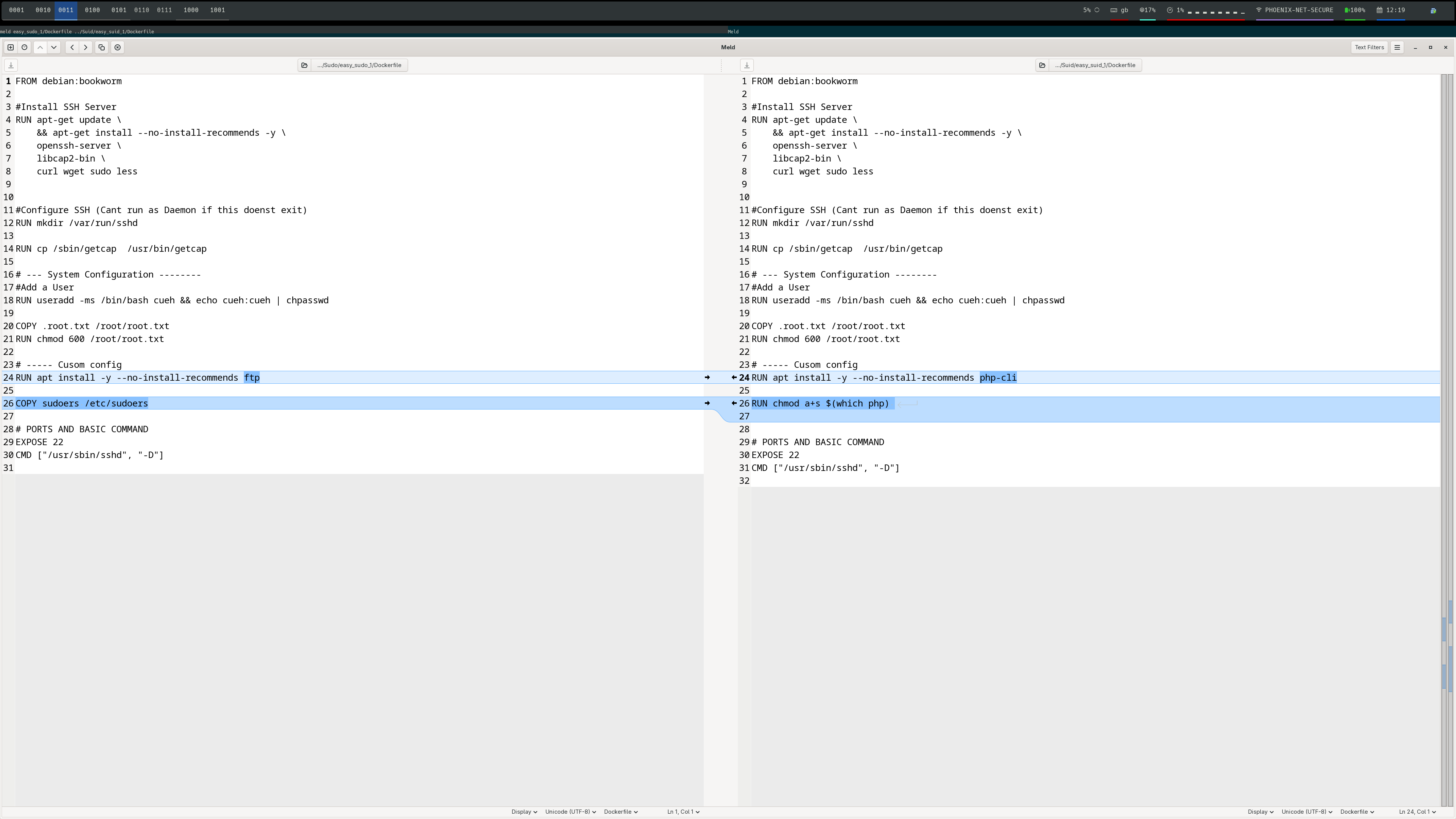
Comparing with a SUID Challenge
Other useful stuff
- USER: su to whoever we specify
- ADD / COPY; Some minor differences, add supports wget etc.
- ADD –chmod –chown: Cange permissions (though can be flakey)
Cool Stuff with Intermediate iamges
- Not massivlty useful in the way I work
- Builder image: Add GCC and all that Jazz
- Distrbution Image: Copy from Builder
Other Things
- Large Number of preconfigured Dockers for common tasks
- Apache / Php / SQL etc.
- Reasonably easy setup, lets you focus on interesting parts.
Docker Compose
Compose
- Orchatrateor for Docker
- Allows us to build stacks of images
- USE IT even if you have one continer
Compose Files
- docker-compose.yaml / docker-compose.yml
- define a list of services
- defines networks etc if used
Compose Services
- Define Individual Elements
- Build / Image Instructions
- Ports to Forwared
- Volumes
Volumes
- Map between images or your host system
- Have quirks: Host Overwrites Local.
- So Only gives content if file is created at boot
- Very useful for debugging.
A Basic Compose File
services:
  ssh:
    build:
      context: .

    ports:
      - "22:22"
Something More Complex
services:
  web:
    build:
      context: webservice
    ports:
      - "80:80"
    restart: unless-stopped
    volumes_from:
      - ssh


  ssh:
    build:
      context: RootBox
    ports:
      - "22:22"
    restart: unless-stopped
    volumes:
      - /home/dev
Networking In compose
- Magic Happens behid the scence
- We can refer to other images on network by their name
- IE. Web can call databasee:3306 rather than needing to know address
Putting Stuff Together
Putting Stuff together
- Lets Do Web and SSH
- Reuse the SSH from before
Web Dockerfile
- Choose Image: php:apache-buster
- Write HTML:
- Create Dockerfile
Web Dockerfile
FROM php:8.5-apache

ADD --chown=www-data:www-data html /var/www/html
Web Dockerfile
- Note No Entrypoint / user etc
- Taken care of by the base php image.
Docker Commpose
services:
    web:
        build:
            context: [DIR]
        ports:
            - 80:80

    ssh:
        build:
            context: [DIR]
        ports:
            - 22:22
dev mode
- To avoid re-building web each time we make a change
- Use a local volume
- MAKE SURE TO CLEAN UP AFTER AS THIS WILL BE BAKED INTO IMAGE
- Add a File upload Function..
Sharing data betwen containers.
- Can use named volumes for this, but janky
- volumes-from is really cool
Sharing data between containers
services:
  web:
    build:
      context: webservice
    ports:
      - "80:80"
    restart: unless-stopped
    volumes_from:
      - ssh


  ssh:
    build:
      context: RootBox
    ports:
      - "22:22"
    restart: unless-stopped
    volumes:
      - /home/dev
Next
Other Advanced Shit
- Build Containers
- More advanced compose networking
- BuildX for cross comping
- Useing Argumets to paramterise docerfiles / compose