Event Driven Programming
Dan Goldsmith
Introduction
Introduction: Doing more than one thing
- In this session we will start to look at getting multiple things happening at once
- Should lead us nicely into tomorrow where we look at the Scheduler
Our Problem:
- Our Embedded systems can only run a single process.
- Essentially ALL of the programs we design use a “Superloop” approach
void main()in our code
- But they will need to do more than one thing at a time.
- Waiting on Input…
Superloop Code Approach
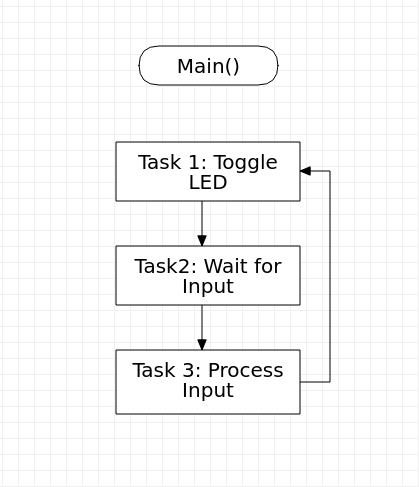
Our Blinking Lights Superloop
int main() {
  // put your setup code here, to run once:
  while(1) {
      ledOne = 1;
      ledTwo = 1;
      thread_sleep_for(500);
      ledOne = 0;
      ledTwo = 0;
      thread_sleep_for(500);
      }
}
Superloop Dealing With State
- Switch what we do depending on the state of the system
while(1){

   if (State == 0){
      // Do State 0 Things
   }
   else if (State == 1){
      // Do State 1 Things
   }
}
Superloop: Dealing with Input
- One way of doing this would be to keep checking the the condition to
be true
- Known as Polling
 while(1) {
     if buttonPressed {
         ...Do Something
         }
     }
Busy waiting
- Will respond quickly to user input
- Keep the processor working, so no low power mode
- When we get to threads, may not move to ready state
- Therefore could take all the processor resources.
A Downside to Polling:
What Happens Here
#include "mbed.h"

DigitalOut ledOne(LED1);
DigitalIn theButton(BUTTON1);

int main() {
    //Loop
    while(1){
        if (theButton){
            ledOne = !ledOne;
        }
    thread_sleep_for(1000);
    }
}
A Downside to Polling:
Or with a sensor that is IO Bound
#include "mbed.h"

DigitalOut ledOne(LED1);
DigitalIn theKeyboard();

int main() {
    //Loop
    while(1){

       //Set value to be current keyboard press
       out = theKeyboard.press()
       ledOne = !ledOne;
       thread_sleep_for(1000);
    }
}
Superloop Downsides
- Gets complex quickly with more than trivial code.
- How do we deal with I/O and blocking operations
- If nothing has happened move on?
- Increase code complexity, also Impossible to predict time taken for an operation to occur?
Event Driven Programming
Event Driven Programming
- Rather than encapsulate our State in the main loop
- Break the job into Tasks that are triggered by Events
- Events can be either Hardware or Software Triggered.
Interrupts.
- Interrupts are a Key concept in Embedded programming
- Avoid us having to busy wait in the superloop.
- Previously we attached an interrupt to a button to toggle LED state.
Types of Interrupt
- Hardware: Attached to state of a pin
- Software:
- Timers
- Exceptions / Watchdog
Recap: Triggering an Interrupt with a button
InterruptIn button(BUTTON1)

//Function called when button is pressed.
void handler(){
  ... //Do Something
}

int main(){
    //Attach interrupt
    button.rise(&handler);
}
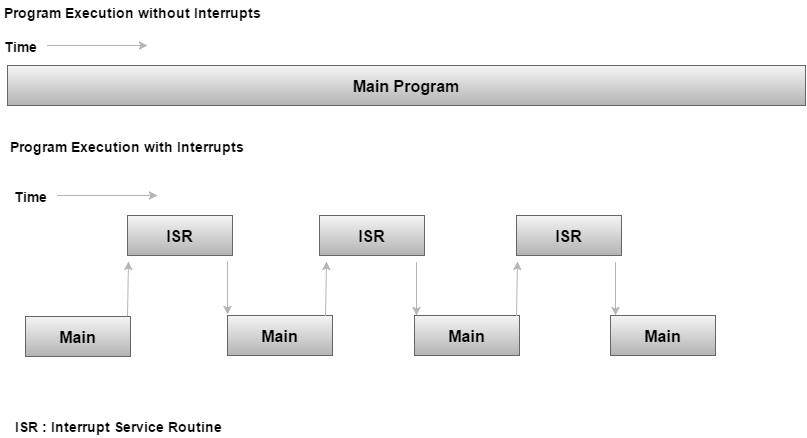
Behind the Scenes with Interrupts
- Our application consists of an Infinite loop that calls functions to
achieve aims
- Background or Task Level
- Interrupt Service Routines (ISRS) handle Asynchronous Events
- Foreground or Interrupt Level
ISR
Saving State
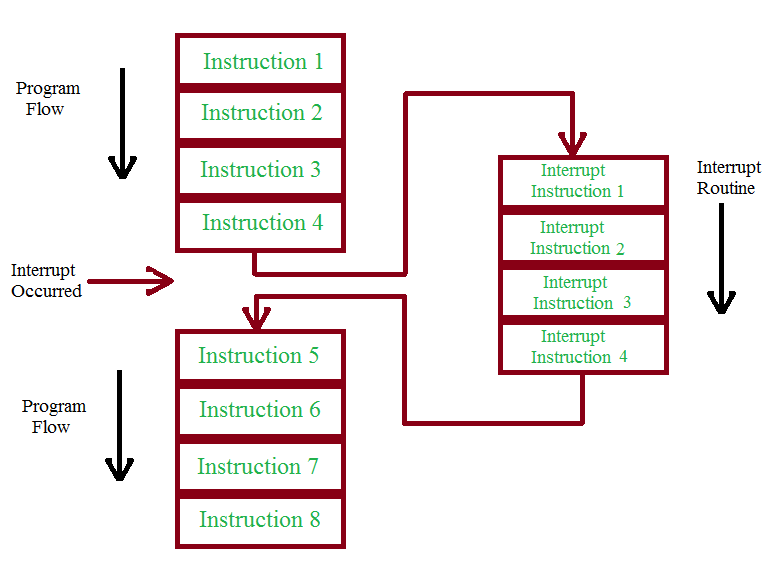
Interrupts Notes:
- An Interrupt could happen at Any Time
- There can be several “Levels” of Interrupt
- Can be triggered by Hardware or Software
Interrupt Notes:
- We Need to Save the State of the system before handing an Interrupt, so we can Revert to the previous state
- We need to very carefully consider how shared elements of code.
Race Conditions
- Unusual behaviour due to unexpected critical dependence on the relative timing of events.
- Result of example code depends on the relative timing of the read and write operations.
Critical Section:
- A section of code which creates a possible race condition.
- The code section can only be executed by one process at a time.
- Some synchronisation mechanism is required at the entry and exit of the critical section to ensure exclusive use.
Reentrant Functions
- A Reentrant Function:
- Can be used by more than one task without causing data corruption
- Can be interrupted at ANY TIME and be resumed later without loss
- Errors caused by non-Reentrant functions can be really difficult to find
Non Reentrant Function
int temp;  //Global

function swap(int x, int y){
   temp = x;
   x = y;
   y = temp;
}
Non Reentrant Function
- Using a Global for temp could cause issues with our
function.
- What happens if an Interrupt gets called during the function being processed
- What happens if the interrupt changes the temp Value?
Reentrant version of the Function
function swap(int x, int y){

   int temp; //Local

   temp = x;
   x = y;
   y = temp;
}
Example of data corruption with Race Condition
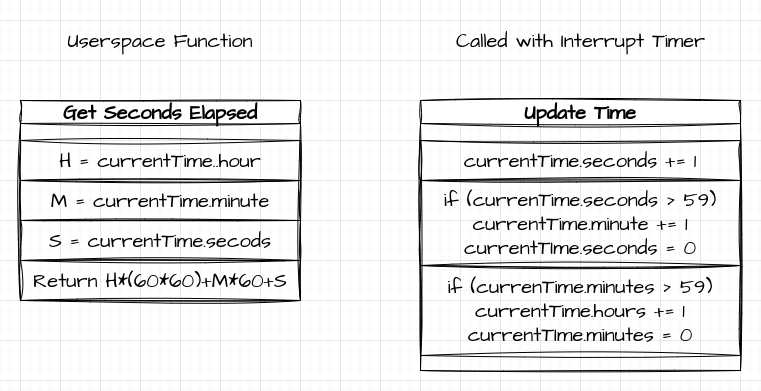
Example of data corruption with Race Condition
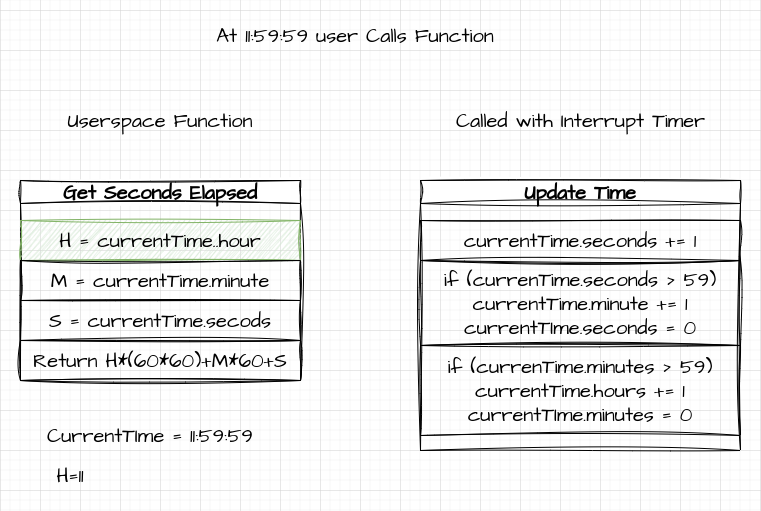
Example of data corruption with Race Condition
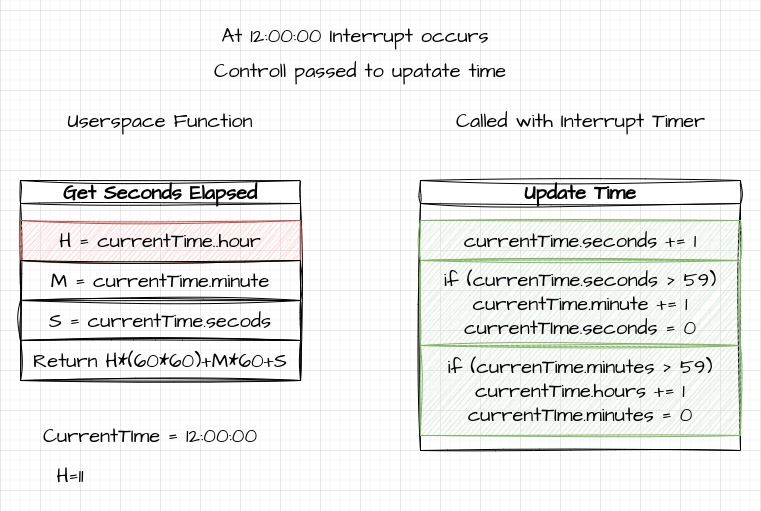
Example of data corruption with Race Condition
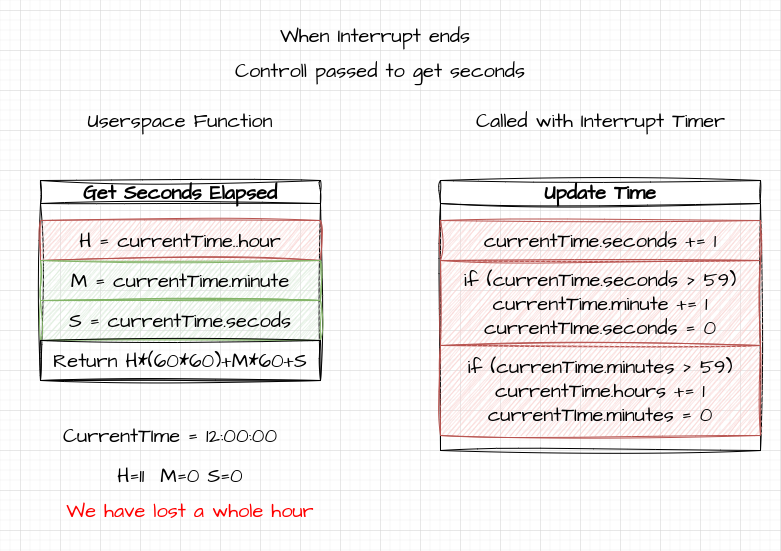
C Volatile Keyword
- Volatile keyword tells C that a value may change outside of control
- Compiler optimisation will cache values
- Means we update value each time we use it
- ASM instruction to get from stack each time accessed
C Volatile Keyword
volatile int value;Dangers of Printf
- Using Printf / Debug can also cause issues with interrupts
- Behind the Scenes Printf buffers the text before pushing to STDOUT
- If an interrupt occurs, the buffer can become corrupted
Long Running Processes in Interrupts
- As an Interrupt takes control of execution, it is not suitable for
long running or blocking tasks.
- ISR is called then Block
- Code execution cannot continue until blocked function completes.
Dealing with some of the downsides of Interrupts
- You WILL use interrupts in your programs
- But we need to consider what we use them for
- Keep working code short
Disabling Interrupts
- We can disable interrupts in our critical section
- Stop other events breaking our code
- Discuss better approaches tomorrow
- We can make use of other multitasking approaches (Threading or the RTOS API)
Using Interrupts
Firing Interrupts based on a Ticker
- The Ticker Object allows us to setup recurring
interrupts.
- Note: Separate from the system ticker using for scheduling.
- Like the InterruptIn we need a handler function.
attach (Callback< void()> func, float t)Ticker Example:
Ticker theticker;
DigitalOut led1(LED1);
DigitalOut led2(LED2);

void handler() {
    led2 = !led2;
}

int main() {
    theticker.attach(&handler, 1.0); // call flip function every 1 seconds

    // spin in a main loop. ticker will interrupt it to call handler
    while(1) {
        led1 = !led1;
        thread_sleep_for(500);
    }
}
Tickers and Long Running Events
void handler() {
    for (int x=0; x<5; x++){
      led2 = !led2;
      thread_sleep_for(100);
      }
}
Issue
- The Light Sequence is not Guaranteed.
- The Longer running interrupt takes control of execution
- We need to take a different approach to solve the problem.
Generating Interrupts with Hardware
- Interrupts are ideal for dealing with hardware input
- A Lot of the time, we sit there waiting for a hardware signal
- Key get Pressed
- Some other event get triggered.
Generating Interrupts with Hardware
- We can attach an Interrupt to a hardware Pin
- We Did this in the first session
- We can also trigger the interrupt based on different pin states
- Rising (Signal goes from LOW to HIGH)
- Falling (Signal goes from HIGH to LOW)
Demo: Setup
DigitalOut led1(LED1);
DigitalOut led2(LED2);
DigitalOut led3(LED3);

InterruptIn btn(BUTTON1);
Ticker theticker;

void buttonHander(){
    printf("BUTTON PRESSED")
    led3 = !led3;
    }


void handler(){
    for (int x=0; x<10; x++){
        led2 = !led2;
        thread_sleep_for(250);
    }
}

int main() {

    btn.rise(&buttonHandler);
    theticker.attach(&hander, 5.0);

    while (1){
        led1 = !led1;
        thread_sleep_for(500);
    }
}
Problem
- So LED1 blinks happily until we hit the button
- Interrupt kicks in and takes control of the Code
- This stops the execution of the Main loop until it is finished.
- Thus our main loop cannot be relied on to make things work
Note:
- What about if we trigger LED1 with an ticker based interrupt?
- We still get the same problem!
- There is only one Interrupt routine, so the periodic one is queued until the blocking routine finishes.
- Consider what would happen if the Interrupt was for an important event!
Interrupts: Summary
- Interrupts are great at letting our system respond to events:
However
- Think about how you use blocking calls, in your interrupt handlers
Event Queues
Event Queues:
- We need to keep the interrupt Context free to handle interrupts.
- This means that we shouldn’t really use Interrupts to perform tasks
- Keep interrupt code to a Minimum.
Event Queue API
- The event queue API gives us a mechanism to “safely” move code execution outside of the interrupt context.
- Create a separate Thread to run events in.
- Interrupts can post events to the queue to be executed outside of
the Interrupt Context.
- Frees up Interrupts for Important Tasks
Event Queue Types:
- We can have multiple event queues in our system
- For example one for dealing with each major component. (IO / Processing, etc)
- Global Shared Event queue.
- Reduces memory use, but only one thread so we need to consider length of time events take.
Threaded Event Queue API: The Setup
- We first need to create a thread to hold the event queue
#include "mbed.h"

// Create a queue that can hold a maximum of 32 events
EventQueue queue(32 * EVENTS_EVENT_SIZE);
// Create a thread that'll run the event queue's dispatch function
Thread t;

int main () {
    // Start the event queue's dispatch thread
    t.start(callback(&queue, &EventQueue::dispatch_forever));
}
Threading Configuration
We may also need to enable threading in our platformio.ini configuration file
[env:nucleo_f401re]
platform = ststm32
board = nucleo_f401re
framework = mbed
build_flags = -D PIO_FRAMEWORK_MBED_RTOS_PRESENT
Adding Interrupt Driven events to the Queue
- We can now enqueue items from Interrupts
//Any interrupt object here can post
button.rise(queue.event(handler));
Or adding from Other Locations
- Check the API for more timing options
void ledEvent(){
    //Add a new event to toggle the LED
    queue.event(ledThreeEvent);
    printf("Event Called");
    for (int x=0; x<10; x++){
        led2 = !led2;
        thread_sleep_for(100);
    }
}
Event Queue Demo:
#include "mbed.h"

DigitalOut led1(LED1);
DigitalOut led2(LED2);
DigitalOut led3(LED3);

//Event Queue Version
// Create a queue that can hold a maximum of 32 events
EventQueue queue(32 * EVENTS_EVENT_SIZE);
//Create an empty thread to run objects in the event queue
Thread thread;

InterruptIn button(USER_BUTTON);
buttonState = 0;

void led3Event(void){
    led3 = !led3;
}

void ledEvent(void){
    //queue.call(led3Event);
    queue.call(printf, "rise_handler in context %p\n", ThisThread::get_id());
    queue.call(led3Event);
    for (int x=0; x<10; x++){
        led2 = !led2;
        thread_sleep_for(500);
    }
}


//Main Program
int main() {
    // Start the event queue
    thread.start(callback(&queue, &EventQueue::dispatch_forever));
    //And make the button interrupt add an event to the queue
    button.rise(queue.event(ledEvent));

    while (true) {
        led1 = !led1;
        thread_sleep_for(250);
        //Debug with Light
        led3=buttonState;
    }
}
What Happens
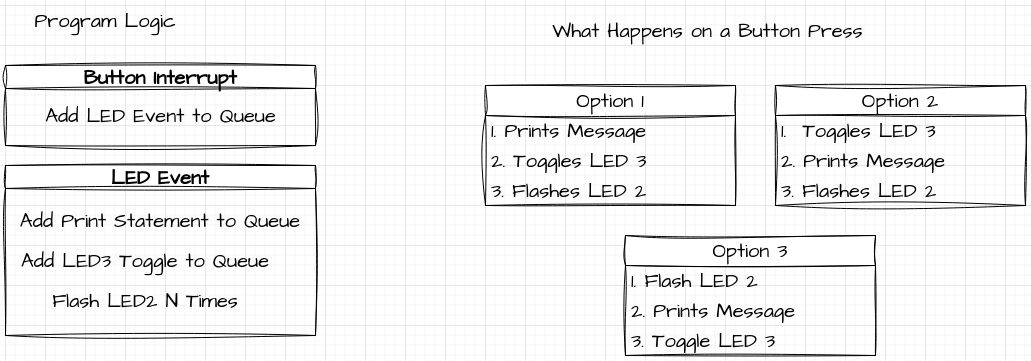
What Happens
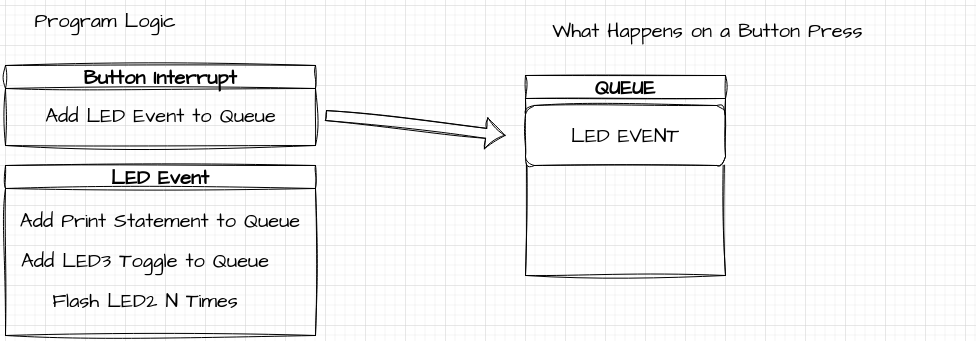
What Happens
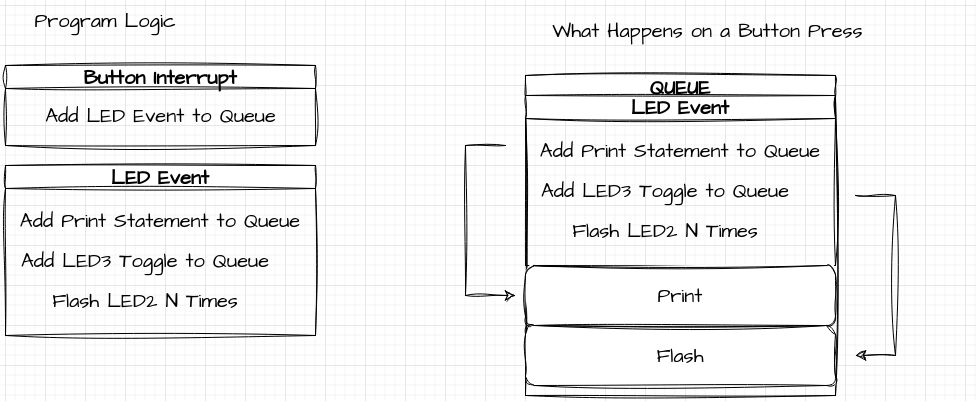
Problems with the Queue
- Second worksheet Example.
- What happens when we queue events from both Interrupts and Inside the handler?
Problems with the Queue:
- It is a Queue
- Events are added and processed sequentially.
- Still a very useful tool for moving content out of the Interrupt routines.
Event Queue Task
- Modify the provided code to use an event queue to meet the following
tasks:
- Normal Operation: Led1 Flashes at a regular interval
- Button Pressed: Led2 Flashes 10 times
- Button Released: Led3 Flashes 6 times
Event Queue Task 2:
- Lets take a look at the Queuing Behaviour
- Without Using the Main Loop
- LED1: Flashes every second
- LED2: Flashes 5 Times every 10 Seconds
- On Button Press:
- Presses 0-4: LED4: Flashes 10 times
- Press 5: Cancel any remaining Flashes.