Writing C++ Code
Dan Goldsmith
Object Orientated Code
Object Orientation
- “Modern” programming philosophy, came into prominence in the 1990s’
- Origins with languages such as Simula (62) and Smalltalk (late 70’s)
- Most of the languages we work with are OO
- Python, C++, Java, etc…
Differences between OO and other Paradigms
- Procedural languages break components of a program according to functionality. (C)
- OO We break the program in to logical blocks of associated data and functionality (C++, Python, Java)
- Purely Functional languages, (Haskell) represent tasks as mathematical procedures.
OO in embedded systems?
- But aren’t we writing μc
specific code?
- Can we make things Generic?
- Isn’t OO more Resource intensive?
OO in embedded systems?
- Yes, However, given the complexity of automotive systems OO has its place.
- Consider a tyre pressure monitoring system?
- Car had 4 Tyres, each an Independent thing
- Additionally, tyre types (front / rear) will have different attributes.
- Good candidate for an Object here.
Classes
Classes
- Core building block of the OO approach
- Designed to encapsulate objects in our programs
- The data associated with an object
- The functions that are performed by this object.
- The code we have written so far has no class
Why Define Classes.
- We write some code that deals with a specific situation
- This code turns out to be useful
- Multiple places in a program
- Over multiple projects
- Why repeat effort?
Classes and Objects
- Class is the template.
- An item or group of items with a particular set of characteristics
- Students, Teachers, Managers, TI’s
- Object is an instance of a particular
class
- Dan (Class Teacher)
How do we define Objects?
- Text book approach “look for Nouns”. (A Car, This car etc)
- A lot of it comes from practice.
- This is a thing that has a set of attributes, thus it is logical that it is an object.
- Is there some shared functionality that it is sensible to group together.
Objects and Attributes.
- Each Object would have a set of attributes associated with it.
- For example, all People have:
- Given Name.
- Family Name.
- Gender
- Age?
Objects and Attributes.
- When first defining attributes, think about the characteristics your
system needs to model.
- It may not be necessary to define all attributes the first time around
- Remember development is an iterative process.
Objects and Functions.
Object will also have a set of functions associate with them.
What do we need to do with a specific object?
So a person may have:
- birthdayMessage()
- Send our user a “happy birthday” message..
- calculateAge()
- Rethink the attributes here?
- birthdayMessage()
Note:
Personally, I like to take an iterative approach to deriving classes and functions. What are the core elements? What are the core tasks? It if becomes clear that we need more functionality then we can update the documentation.
Writing Object Orientated Code
Lets Build upon our Flashing Object to use a Class
- Our Stateful Flasher is a good candidate for a class
- We can come back and re-use this later
Starting Point
// Variable to hold button State, this needs to be globally avaialable
int buttonState;

// Hander Function for our Buton Press
void handler(){
      printf("Update Button State\n");
      buttonState = !buttonState;
    }

int main() {

  // put your setup code here, to run once:
  //Setup the LED1 pin to be a digital output called ledOne
  DigitalOut ledOne(LED1);

  //Setup the User Buton as an Input
  InterruptIn theButton(USER_BUTTON);

  //Bind the interupt to a function
  theButton.rise(&handler);

  while(1) {
    // put your main code here, to run repeatedly:

    //Print the State of our button
    printf("Button State is %d\n", buttonState);


    //Is the Button Pressed
    if (buttonState) {
      ledOne = 1;
      thread_sleep_for(2000);
      ledOne = 0;
      thread_sleep_for(2000);
    }
    else{
      ledOne = 1;
      thread_sleep_for(500);
      ledOne = 0;
      thread_sleep_for(500);
    }
  }
}
Designing our Function
- Work out Blocks of code that are repeated.
- Look for things that change each time the function is called (Parameters)
- Does the function need to return anything?
C/C++ Function Syntax
Take the form Return Type Funtion Name (parameters)
- Return Type we don’t need to return anything, so void is good
- Function Name Something sensible that describes the functionally
- Parameters Length of time to sleep for (an integer)
Flashing as a Function.
void flash(int sleep){
    ledOne = 1;
    thread_sleep(sleep);
    ledOne = 0;
    thread_sleep(sleep);
   }
And Calling the Function
- We can now call the function using its name..
int main() {
   //Flash with one second Delay
   flash(1000);
Any Improvements??
What else can we change?
Any Improvements?
- Our Spec had different On / Off times
- Allow user to specify the LED that is used.
Lab Task (Lab Sheet 2)
- Implement a Flasher function
- Allow use to specify the:
- Delay On
- Delay Off
- LED to use (this is of type DigitalOut)
Lab Task Function Definition
void flash(DigitalOut theLed,  int ledOn, int ledOff){
...
}
Writing Classes in C
Example: Getting Classy.
- Let congratulate ourselves on writing a function that reduces
effort.
- If there is an issue only fix in one place.
- Then the spec changes.. We now need to flash another Led.
- We could have separate functions (flash1, flash2).
- Lets turn the Flashing code into a class
Defining our Class
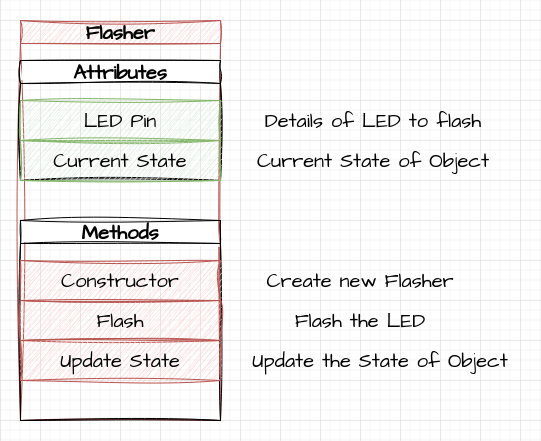
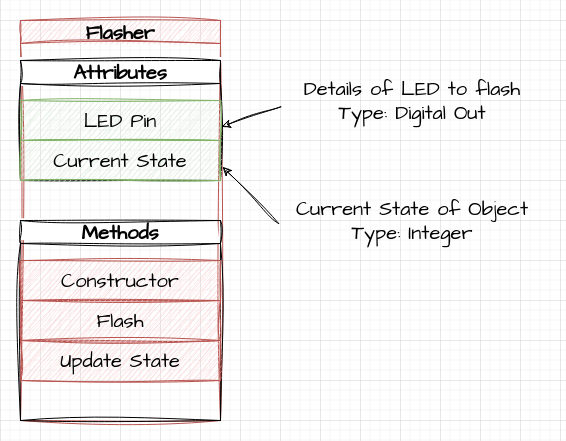
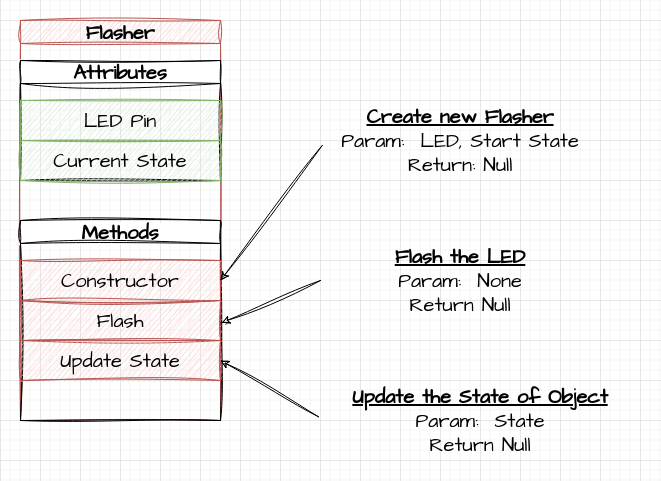
- Stage one, We want to think about the class itself:
- What are its Attributes
- What are its Functions
- How to the functions work
Defining our Class
Defining our Class
Defining our Class
C++ Class Syntax
class Flasher{
  // Attributes

  // Methods

};
Defining Variables:
class Flasher{

  // Attributes
  private:
    DigitalOut theLed;
    int state;


  // Methods
};
Private / Public etc.
- You may notice some syntactical sugar
- Availability of attributes and methods
- private: only available to that class
- public: available to everyone
Adding A Function to the Class
- Our next stage is to add the Flash Function.
- We have already designed this. (And the syntax remains the same)
- However, we can now make use of the Classes Attribute Variables
Adding our Flash Function
class Flasher{
  // Variables
  private:
    DigitalOut theLed;
    int state;


  // Methods

  public:

  void flash(){
    if (state == 0){
      theLed = 1;
      thread_sleep_for(1000);
      theLed = 0;
      thread_sleep_for(1000);
    }
    else {
      theLed = 1;
      thread_sleep_for(5000);
      theLed = 0;
      thread_sleep_for(5000);
    }
  }
};
Creating a Flasher Object
- Our Code is 90% Done,
- We just need a method of Creating a Flasher Object
- Provide the initial Variables for the Class
- For this we add a constructor function
Example: Note, Some issues.
- The code is not quite as simple as we would like it to be, due to
quirk of C++
- Objects within the class are created BEFORE the classes constructor is called.
- Normally they are initialised as Empty items, but the API for our DigitalOut object, needs a pin.
- Need to use an Initilization List here.1
Example: Putting it into Code, initialising the pin..
 Flasher(PinName thePin, int startState) : theLed(thePin){
    state = startState;
  }
Example: Flashing the lights
- So now we have a class we can simplify the code to make use of it
int main() {

  ....
  // Global Flasher Object
  Flasher theFlasher(LED1, 0);

  while(1) {
    theFlasher.flash();
    }
}
Final Code
class Flasher{
  // Variables
  private:
    DigitalOut theLed;
    int state;


  // Methods

  public:

  Flasher(PinName thePin, int startState) : theLed(thePin){
    state = startState;
  }

  void flash(){
    if (state == 0){
      theLed = 1;
      thread_sleep_for(1000);
      theLed = 0;
      thread_sleep_for(1000);
    }
    else {
      theLed = 1;
      thread_sleep_for(5000);
      theLed = 0;
      thread_sleep_for(5000);
    }
  }

};


// Variable to hold button State, this needs to be globally avaialable
int buttonState;

// Hander Function for our Buton Press
void handler(){
      printf("Update Button State\n");
      buttonState = !buttonState;

    }

int main() {

  // put your setup code here, to run once:

  //Setup the User Buton as an Input
  InterruptIn theButton(USER_BUTTON);

  //Bind the interupt to a function
  theButton.rise(&handler);

  // Global Flasher Object
  Flasher theFlasher(LED1, 0);

  while(1) {
    //Print the State of our button
    printf("Button State is %d\n", buttonState);

    theFlasher.flash();

  }
}
Task:
- Add an Update State Function to our flasher object
- Add code to update the state of the flasher based on button press
- Update the code to have more than one state.
Questions
- Any Questions ?