6047CEM Cyber Security Project
Referencing in your Dissertation Report

Referencing in your Dissertation Report

Dr Ian Cornelius

Hello

Referencing

Referencing (1)

Why do we Reference?

  • Referencing is done to help avoid plagiarism
  • You must cite your reference when you do any of the following:
    • use a direct quote
    • paraphrase something you have read
    • summarise what someone else has said
    • inclusion of data, images and diagrams that you have not created yourself

Referencing (2)

Elements of Referencing

  • There are two elements to referencing:
    • in-text citations
    • a list of references (bibliography)

In-text Citations

  • A short reference that goes in the body of the text
  • Includes the authors/company’s name and the year of publication
    • may include page numbers if relevant

List of References

  • Comes at the end of the report
  • Provides the additional information to the in-text citation
    • i.e. title and publisher
  • Presented in alphabetical order by author and a single list

Referencing (3)

How to Reference: Authors

  • There are various different formatting methods when it comes to referencing authors

One or two Authors

  • Use all their names in both the in-text citation and list of references
  • Example for in-text citation:
    • (Cornelius & Richards, 2022)
  • Example for list of references:
    • Cornelius, I., & Richards, T. (2022). Referencing in 6047CEM (1st ed.). Coventry University.

3+ Authors

  • Use the first name of the author, followed by et al. for an in-text citation
  • You must list all authors for the list of references
  • Example for in-text citation:
    • (Cornelius et al., 2022)
  • Example for a list of references:
    • Cornelius, I., Richards, T., & Goldsmith, D. (2022). Referencing in 6047CEM (2nd ed.). Coventry University.

No Authors

  • Cannot find a name? use the company or organisation’s name
  • Example for in-text citation:
    • (Coventry University, 2022)
  • Example for list of references:
    • Coventry University (2022). Referencing in 6047CEM. http://github.coventry.ac.uk/pages/CUEH/6047CEM/ [Accessed 21st November 2022]

Referencing (4)

How to Reference: In-text Citations

  • Two acceptable methods to using in-text citations in your report:
    1. Parenthetical
    2. Narrative

Parenthetical

  • All information pertaining to the reference is included at the end of the sentence in brackets
    • the citation should be before the full-stop/period (‘.’)

“There was a lot of misconceptions when it came to use of in-text citations and the location of the citation itself. (Cornelius, 2022).”

Narrative

  • The author’s name is included in the structure of the sentence
  • The year of publication for the source should be provided in brackets
    • placed just after the author’s name
  • If quoting a page number, it should be placed at the end of the sentence

“Cornelius (2022) stated in their work that”there was a lot of misconception when it comes to the use of in-text citations” (p. 1).”

Referencing (5)

How to Reference: Figures and Tables

  • Labels are used to describe what the figure or table is showing
  • For Figures, pre-fix the label with Figure followed by the chapter number and sequential number of the figure
    • i.e. Figure 1.1 is the first figure in the introduction chapter
  • For tables, pre-fix the label with Table followed by the chapter number and sequential number of the table
    • i.e. Table 4.5 is the fifth table in the fourth chapter
  • If you have copied information from a publication, you must provide an in-text citation
    • this would be provided inside the caption for the figure or table
    • i.e. Figure 5.6. Peoples favourite fruit (Cornelius, 2022).

Referencing (6)

Reference Formatting

Source In-text Citation Reference List
Books [@KostCharlesP.author2015Sqrs, p. 204] Kost, C. P. (2015). Student quick reference success guide to writing in the APA 6th edition style.
Journal [@TyagiVirat2021EHaA, p. 236] Tyagi, V. (2021). Ethical hacking and advance python. International Journal for Research in Applied Science and Engineering Technology, 9(5), 234–239.
Website (Author) [@Cornelius6047CEM] Cornelius, I. (n.d.). 6047CEM - cyber security report. https://github.coventry.ac.uk/pages/CUEH/6047CEM/
Website (No Author) [@NoAuthor6047CEM] 6047CEM - cyber security report. (n.d.). https://github.coventry.ac.uk/pages/CUEH/6047CEM/

Referencing (7)

Reference Managers

  • Great for keeping track of papers, books or articles you have read
  • Various methodologies for doing this:
    • LaTeX: create a .bib file with all your BibTex sources
    • Microsoft Word: Mendeley, RefWorks etc.
  • Provides assistance to reference correctly
    • i.e. Microsoft Word has a built-in Mendeley plugin

Referencing using LaTeX

Referencing using LaTeX (1)

Sourcing LaTeX References

  • LaTeX uses a bibliography management package known as bibtex
    • uses a database of references, a file with a .bib extension
  • Requires using a package called natbib to make citations
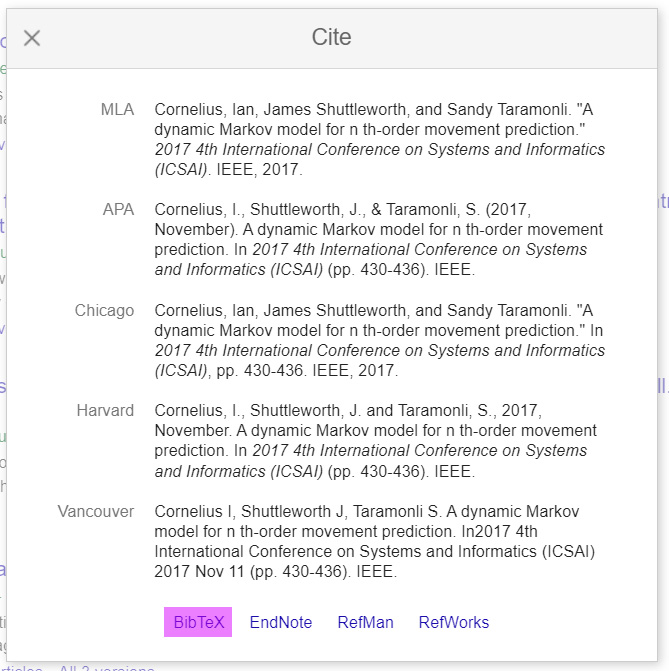
  • Google Scholar provides a BibTeX entry for each paper you source

Example of a Google Scholar Paper Entry

Example of a BibTeX Entry

@inproceedings{cornelius2017dynamic,
  title={A dynamic Markov model for n th-order movement prediction},
  author={Cornelius, Ian and Shuttleworth, James and Taramonli, Sandy},
  booktitle={2017 4th International Conference on Systems and 
    Informatics (ICSAI)},
  pages={430--436},
  year={2017},
  organization={IEEE}
}

Reference using LaTeX (2)

Structure of the BibTex File

  • BibTeX’s entries will be located in the database file (.bib)
  • There are different categories for references:
    • inproceedings: refers to a paper published from a conference
    • phdthesis: refers to a report published as part of a PhD thesis
    • journal: refers to an article published in an academic journal
    • book: refers to a book

Example of a BibTeX Database: inproceedings

@inproceedings{cornelius2017dynamic,
  title={A dynamic Markov model for n th-order movement prediction},
  author={Cornelius, Ian and Shuttleworth, James and Taramonli, Sandy},
  booktitle={2017 4th International Conference on Systems and 
    Informatics (ICSAI)},
  pages={430--436},
  year={2017},
  organization={IEEE}
}

Example of a BibTeX Database: phdthesis

@phdthesis{cornelius2019dynamic,
  title={A Dynamic Stochastic Model for Real-time Analysis and 
    Predictions for Movement Exhibited by an Object},
  author={Cornelius, Ian},
  year={2019},
  school={Coventry University}
}

Reference using LaTeX (3)

Citing References in a LaTeX Report

  • In-text citations are made using either:
    • \citet{Name_of_BibTeX_Entry}
      • provides a narrative citation: e.g. “Cornelius (2017)”
    • \citep{Name_of_BibTeX_Entry}
      • provides a parenthetical citation: e.g. “(Cornelius, 2017)”
  • Add an asterisk (*) to the end of the above commands, to provide all surnames of the authors

Creating a Bibliography/List of References

  • Bibliography or list of references is created by using:
    • \bibliographystyle{Reference_Style}
      • include a .csl for the appropriate referencing style
    • \bibliography{BibTeX_Database.bib}
      • refers to the database file for BibTeX entries

Reference using LaTeX (4)

Compiling the LaTeX Report

  • Building your report requires:
    1. Compiling the report using pdflatex
    2. Compiling the bibliography database using bibtex
    3. Compiling the report using pdflatex
    4. Compiling the report using pdflatex
  • A handy Makefile is provided with the template to compile your report
    • only works for a Linux environment
    • need a Windows script? Ask!
  • Report and Project Proposal Template:

Referencing using Microsoft Word

Referencing using Microsoft Word (1)

How to reference with Microsoft Word

  • Microsoft Word consists of an in-built reference manager
  • There are alternative plugins:
    • i.e. RefWorks and Mendeley
  • This lecture is concerned with the in-built reference manager
  • Uses an XML document to handle your references
    • difficult and tedious to maintain
    • custom Python script provided to convert .bib file to .xml
  • Handy Python script for converting:

Referencing using Microsoft Word (2)

Using the Python Script

  • Create your .bib file with references obtained from Google Scholar
  • Install a third party module:
    • python3 -m pip install bibtexparser
  • Run the Python script:
    • python3 bib2xml.py --input filename.bib --output filename.xml

Limitations of the Python Script

  • Only handles the following types of references:
    • Conference Papers
    • Journal Articles
    • Web Sites
  • Need something additional?

Referencing using Microsoft Word (3)

Importing the References into Microsoft Word

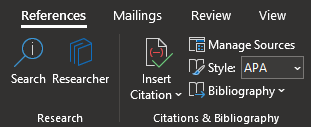
  • Reference management can be done under the References tab
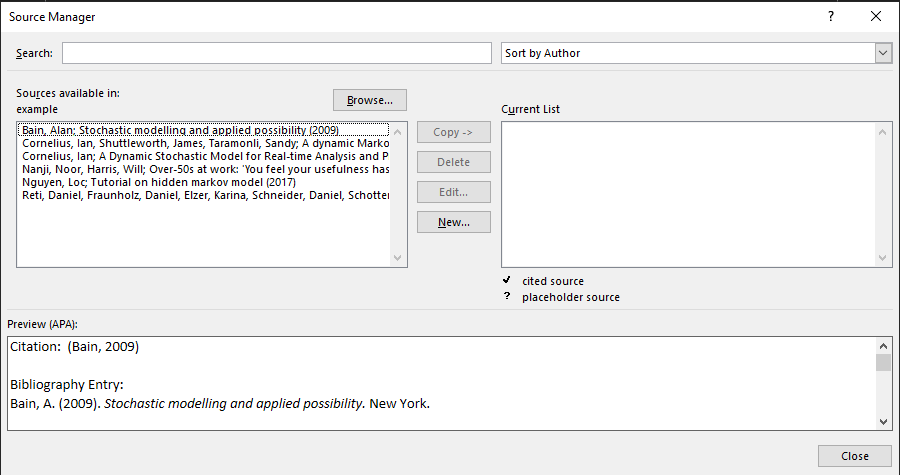
    • click on the Manage Sources label

  • Click on the Browse button and search for the exported XML file from the Python script
    • once loaded, you will see your collection of references

Referencing using Microsoft Word (4)

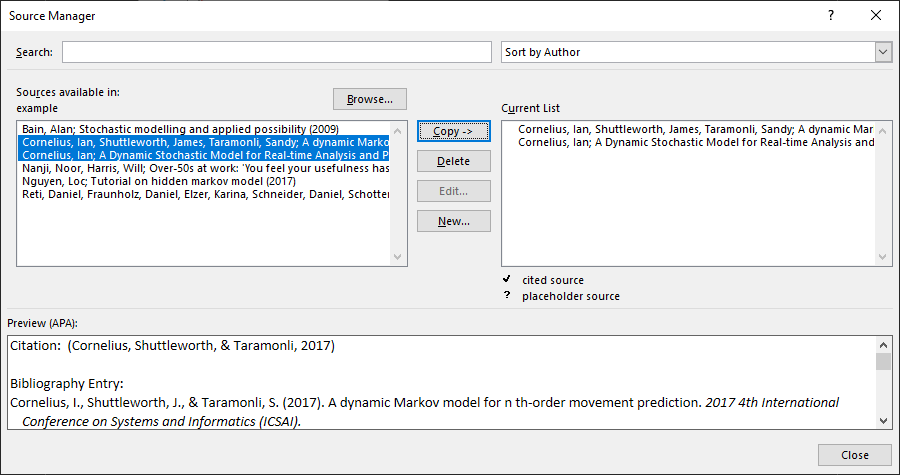
Displaying the Imported References

  • Use the Copy -> button to transfer references you want to use in your report

  • List of references can be created using the Bibliography option in the References tab

Referencing using Microsoft Word (5)

Using a Citation in your Report

  • Citations can be included using the Insert Citation option in the References tab
    • limited to only parenthetical in-text citations

Goodbye

Goodbye (1)

Questions and Support

References